
Hello all!
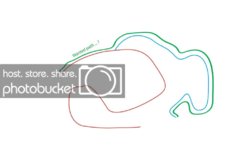
I've been working with Illustrator recently, and I've got this problem. When I draw two paths, for example, see the little drawing underneath, I drew the path in red and the one in blue. Now, say I would like to make a new path, made from these two, like the green one. But don't get me wrong, the green has been moved a bit up, as to not clutter the rest of the image.
So, I would like my path to *start* with the red path, then at a certain point leave from the red path and continue to the blue path.
Now, I was wondering (and hoping), is there any predefined control for something like this? Or perhaps a walk-around? What would you guys suggest?
Thanks a lot for your replies!
Take care,
Gabriel
Here is the example drawing:
I've been working with Illustrator recently, and I've got this problem. When I draw two paths, for example, see the little drawing underneath, I drew the path in red and the one in blue. Now, say I would like to make a new path, made from these two, like the green one. But don't get me wrong, the green has been moved a bit up, as to not clutter the rest of the image.
So, I would like my path to *start* with the red path, then at a certain point leave from the red path and continue to the blue path.
Now, I was wondering (and hoping), is there any predefined control for something like this? Or perhaps a walk-around? What would you guys suggest?
Thanks a lot for your replies!
Take care,
Gabriel
Here is the example drawing:
Last edited:


