
+ Reply to Thread
Page 1 of 2 12 LastLast
Results 1 to 10 of 12

Thread: Fake Tattoo

  1. #1
    Junior Member
    Join Date
    Oct 2010
    Location
    Darwin Northern Territory Australia
    Posts
    13
    Thanks
    0
    Thanked 0 Times in 0 Posts

    Fake Tattoo

    Hi all,

    this is a picture i done for a friend to add a fake tattoo.
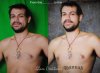


    Fake Tattoo-seany-before-after.jpg

  2. #2
    Guru
    Join Date
    Aug 2010
    Location
    The Abyss
    Posts
    952
    Thanks
    0
    Thanked 0 Times in 0 Posts

    Re: Fake Tattoo

    It looks shopped.. You need to fix the perspective of the tat and then fix the shading...
    You can call me Kev, if you need anything just ask! Please take a moment to read the rules here!
    FORUM RULES PLEASE READ - CLICK HERE TO READ
    FREELANCE SECTION RULES - CLICK HERE TO READ

  3. #3
    Member
    Join Date
    Aug 2010
    Posts
    84
    Thanks
    0
    Thanked 0 Times in 0 Posts

    Re: Fake Tattoo

    Your backdrop is also giving the guys skin a green cast in some areas. IDK if that's all you had to work with but I'd suggest something more neutral or white.

  4. #4
    Junior Member
    Join Date
    Oct 2010
    Location
    Darwin Northern Territory Australia
    Posts
    13
    Thanks
    0
    Thanked 0 Times in 0 Posts

    Re: Fake Tattoo

    Thanks for the feedback guys- the perspective is my bad after i finished i also thought hmm that could have been done better.

    Re the green cast YES & please HELP having major frustrations. I bought a green backdrop as i hear its easy to extract the background but to be honest i find it really hard. I've followed all sorts of tutorials and cant seem to find one that works 100%. I keep getting the green cast especially when abstracting hair (this is a nightmare) i'll post a new photo of what i done last night to better explain. Heading will be under green backdrop help.-

    Thanks again- glad i found this forum

  5. #5
    Guru
    Join Date
    Aug 2010
    Location
    The Abyss
    Posts
    952
    Thanks
    0
    Thanked 0 Times in 0 Posts

    Re: Fake Tattoo

    Dude, get rid of the green background completely....
    You can call me Kev, if you need anything just ask! Please take a moment to read the rules here!
    FORUM RULES PLEASE READ - CLICK HERE TO READ
    FREELANCE SECTION RULES - CLICK HERE TO READ

  6. #6
    Guru
    Join Date
    Jul 2009
    Location
    right in front of you
    Posts
    5,904
    Thanks
    23
    Thanked 147 Times in 144 Posts

    Re: Fake Tattoo

    I suggest getting a better looking subject (preferably a chick)and green wont be noticeable .lol J/K

  7. #7
    Power User
    Join Date
    Sep 2010
    Location
    Southern, Illinois
    Posts
    391
    Thanks
    11
    Thanked 38 Times in 37 Posts

    Re: Fake Tattoo

    The subject is too close. Put six feet between your subject and the green screen to remove the color bleed.

  8. #8
    Junior Member
    Join Date
    Oct 2010
    Location
    Darwin Northern Territory Australia
    Posts
    13
    Thanks
    0
    Thanked 0 Times in 0 Posts

    Re: Fake Tattoo

    Thanks for the feedback since this shot have learnt so much about green screens from here and the net its not just a matter of placing a subject infront of the screen its all about lighting and the position of the subject. Cant wait to try another now that i understand the way it works. bye for now

  9. #9
    Junior Member
    Join Date
    Dec 2010
    Posts
    5
    Thanks
    0
    Thanked 0 Times in 0 Posts

    Re: Fake Tattoo

    yeah it doesnt look 2 natural

  10. #10
    Junior Member
    Join Date
    Jan 2011
    Location
    Texas
    Posts
    5
    Thanks
    0
    Thanked 0 Times in 0 Posts

    Re: Fake Tattoo

    try shooting in front of a white screen, and then screen blend mode him over whatever background you want. That or just put some distance in between him and the background.


Posting Permissions

  • You may not post new threads
  • You may not post replies
  • You may not post attachments
  • You may not edit your posts
Powered by vBulletin® Version 4.1.9
Copyright © 2012 vBulletin Solutions, Inc. All rights reserved.
Content Relevant URLs by vBSEO 3.6.0
Copyright 2011 Photoshop Gurus Forum. All rights reserved.
All times are GMT -5. The time now is 05:31 PM.
vBulletin Skins