+ Reply to Thread
Results 1 to 9 of 9
Like Tree7Likes
  • 3 Post By Ronano
  • 4 Post By fenix

Thread: Yay Colour Replacement!

  1. #1
    Junior Member
    Join Date
    Sep 2011
    Posts
    21
    Thanks
    1
    Thanked 0 Times in 0 Posts

    Yay Colour Replacement!

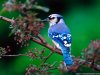
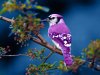
    It was a bit difficult with all the different shades of blue, but I got it.
    Just cuz I love colour replacement!
    Before:
    Yay Colour Replacement!-beautiful-blue-bird-wallpaper.jpg
    After:
    Yay Colour Replacement!-beautiful-blue-bird-wallpaperedit.jpg
    $1r_M4x1mu$, Vafann and ibclare like this.

    Whipped up my sig in a few minutes. literally. will make a better one soon...

  2. #2
    Forum Mod
    Join Date
    Jun 2011
    Location
    Uk
    Posts
    5,598
    Thanks
    85
    Thanked 449 Times in 424 Posts

    Re: Yay Colour Replacement!

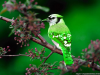
    Colour replacement is fun which method did you use. As this image is simple and the only blue channels are the bird I would choose Image> adjustment> hue saturation on the 2nd drop down menu in the hue screen take it of master and choose blues then slide your slider to where you want it and then choose cyan channel and do the same. It is a quick method and takes less than 30 seconds for the image. Here is how it would look using hue saturation method but you can choose your own colour.
    Yay Colour Replacement!-beautiful-blue-bird-wallpaper.png

  3. #3
    Guru
    Join Date
    May 2011
    Location
    Sweden
    Posts
    1,359
    Thanks
    34
    Thanked 55 Times in 54 Posts

    Re: Yay Colour Replacement!

    REALLY COOL!!! I would also like to know how you did that!

  4. #4
    Guru
    Join Date
    Aug 2011
    Location
    Sweden
    Posts
    559
    Thanks
    28
    Thanked 32 Times in 32 Posts

    Re: Yay Colour Replacement!

    ooooh, now you scared him!
    Vafann, Hoogle, ibclare and 1 others like this.
    BTC - 1D9hQP5hgGRRtYzsPd1pjA4Mfu6irodRip
    PGP - 0x13C873D5

  5. #5
    Forum Mod
    Join Date
    Jun 2011
    Location
    Uk
    Posts
    5,598
    Thanks
    85
    Thanked 449 Times in 424 Posts

    Re: Yay Colour Replacement!

    lol I was expecting to see a cat.

  6. #6
    Guru
    Join Date
    Jul 2011
    Location
    San Diego, CA
    Posts
    593
    Thanks
    9
    Thanked 25 Times in 25 Posts

    Re: Yay Colour Replacement!

    Hi-larious!

    I will have to experiment with the color changing - great tool!


    Agent

  7. #7
    Junior Member
    Join Date
    Sep 2011
    Posts
    21
    Thanks
    1
    Thanked 0 Times in 0 Posts

    Re: Yay Colour Replacement!

    Quote Originally Posted by Vafann View Post
    REALLY COOL!!! I would also like to know how you did that!
    It's literally just the colour reolacement tool, which I love I just like things being a weird colour, or not the one they're supposed to be
    I had to work on it, because of the different shades of blue on it.

    And thanks guys for the comments

    ANd fenix - lol

    Whipped up my sig in a few minutes. literally. will make a better one soon...

  8. #8
    Guru
    Join Date
    Jan 2011
    Location
    Elizabeth Port NJ
    Posts
    1,503
    Thanks
    15
    Thanked 149 Times in 143 Posts

    Re: Yay Colour Replacement!

    Nice job Ronano

    It looks really cool.

    Keep it up.
    Cuando soy Bueno, soy muy BUENO
    Pero cuando soy malo, soy mucho MEJOR

  9. #9
    Junior Member
    Join Date
    Sep 2011
    Posts
    21
    Thanks
    1
    Thanked 0 Times in 0 Posts

    Re: Yay Colour Replacement!

    Thanks Sir Maximus

    Whipped up my sig in a few minutes. literally. will make a better one soon...


Tags for this Thread

Posting Permissions

  • You may not post new threads
  • You may not post replies
  • You may not post attachments
  • You may not edit your posts
Powered by vBulletin® Version 4.1.9
Copyright © 2012 vBulletin Solutions, Inc. All rights reserved.
Content Relevant URLs by vBSEO 3.6.0
Copyright 2011 Photoshop Gurus Forum. All rights reserved.
All times are GMT -5. The time now is 06:33 PM.
vBulletin Skins