Closed Thread
Results 1 to 8 of 8
  1. #1
    Newbie
    Join Date
    May 2011
    Posts
    3
    Thanks
    1
    Thanked 0 Times in 0 Posts

    Need some help cutting out a few holes

    Hey there,

    i have NO experience in drawing or these programs in general. I am trying to add 6 more holes to someone else's work in the hopes that I can get this sent off to a laser cutter.... reason is irrelevant.


    Anywho I need help on what I need to do to add these three holes and maintain the proper spacing and size base on the previous 6(per side). Photos to follow
    Attached Thumbnails Attached Thumbnails Need some help cutting out  a few holes-current-version.png  

    Need some help cutting out  a few holes-what-i-need-done.png  

    Attached Files Attached Files

  2. #2
    Forum Mod
    Join Date
    Mar 2002
    Location
    Here... ?
    Posts
    4,990
    Thanks
    10
    Thanked 191 Times in 189 Posts

    Re: Need some help cutting out a few holes

    Why does this remind me of a security card Key?

  3. The Following User Says Thank You to dv8_fx For This Useful Post:

    WarrenBerry (05-13-2011)

  4. #3
    Newbie
    Join Date
    May 2011
    Posts
    3
    Thanks
    1
    Thanked 0 Times in 0 Posts

    Re: Need some help cutting out a few holes

    "Why does this remind me of a security card Key?"

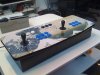
    Lol. What its for is a mame arcade box. The 6(9) holes are for buttons. If you look you will see a smaller hole surrounded by four smaller holes. those are mounts for the joysticks.

    Heres a photo of the finished product some other guy did. I hope to use his template and add 3 extra buttons per player but cant figure out Corel Draw.

    Once I do, however, I can get the template laser cut on plastic and use a CNC machine for the wood. The rest is wiring which is easy enough.
    Attached Thumbnails Attached Thumbnails Need some help cutting out  a few holes-17_final_exterior.jpg  

    Last edited by WarrenBerry; 05-13-2011 at 09:43 AM.

  5. #4
    Guru
    Join Date
    Mar 2010
    Location
    Mesa, Arizona
    Posts
    1,107
    Thanks
    0
    Thanked 71 Times in 70 Posts

    Re: Need some help cutting out a few holes

    Use the rectangular marque tool to select the 3 circles. Hit ctr+alt+t, now hold the shift key to keep it aligned and drag down to the position you want (use the blue lines as a guide to placement). When you have right hit enter and de-select.


    Uploaded with ImageShack.us

  6. #5
    Newbie
    Join Date
    May 2011
    Posts
    3
    Thanks
    1
    Thanked 0 Times in 0 Posts

    Re: Need some help cutting out a few holes

    RE Hawkeye:

    Dear Sir, the object itself is the grey background. Using Ctrl Alt + T I cannot select the holes themselves. I can certainly bring up a marquee tool using the commands you have provided me with( though I cannot find it in corel draw) and I do understand that shift "binds" the object to a spline...

    I cant select the three holes. Its like the object itself is the arcade board and the holes are cut in the object itself.

    This is going off to a manufacturer where they will read this in a CNC program and cut this in both wood and plastic.

  7. #6
    Guru
    Join Date
    Mar 2010
    Location
    Mesa, Arizona
    Posts
    1,107
    Thanks
    0
    Thanked 71 Times in 70 Posts

    Re: Need some help cutting out a few holes

    My mistake, I didn't notice you were not using Photoshop.

  8. #7
    Senior Member
    Join Date
    Feb 2011
    Location
    Port Elizabeth South Africa
    Posts
    104
    Thanks
    0
    Thanked 5 Times in 5 Posts

    Re: Need some help cutting out a few holes

    I can help you in Corel. But I'm not sure - is it just the spacing of the button you are having a problem with? Thats the only difference I see in the 2 images as you already have the extra buttons. Whichever, let me know and I'm pretty sure I can help you here.

  9. #8
    Guru
    Join Date
    Jul 2009
    Location
    right in front of you
    Posts
    5,904
    Thanks
    23
    Thanked 147 Times in 144 Posts

    Re: Need some help cutting out a few holes

    This guy hasn't been back here since he posted Last Activity 05-13-2011 06:06 PM, over a month ago, I'll assume he is all set. If not he can request to reopen.


Tags for this Thread

Posting Permissions

  • You may not post new threads
  • You may not post replies
  • You may not post attachments
  • You may not edit your posts
Powered by vBulletin® Version 4.1.9
Copyright © 2012 vBulletin Solutions, Inc. All rights reserved.
Content Relevant URLs by vBSEO 3.6.0
Copyright 2011 Photoshop Gurus Forum. All rights reserved.
All times are GMT -5. The time now is 09:35 PM.
vBulletin Skins