-
Member
How to create smoke.
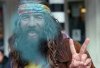
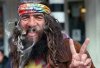
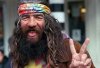
First I selected my image which in this case is a hippie.
-
-
Member
Re: How to create smoke.
I then opened a new layer and selected the brush tool. I set the brush hardness to 0 and my brush size to 67 to create the smoke. I chose a blueish gray color and set the layer opacity to 53%. You can set the brush size and layer opacity to what ever you want to get your desired effect.
-
-
Guru
Re: How to create smoke.
teehee..
-
-
Member
Re: How to create smoke.
lol nice. it really just depends on want kind of smoke you are looking for
-
-
Guru
-
-
Member
Re: How to create smoke.
lol, i requested this tutorial quite a long time ago... did you just come up with the idea on your own or did you go through the requested tuts thread?
-
-
Guru
Re: How to create smoke.
Ok, i will have to admit it to everyone, i cheated!!
Not to steal Pinheads thunder or anything but here is a great Smoke brush pack!! If you use it with Pinheads techniques, im willing to bet you'll have the best fake smoke around!!
https://rapidshare.com/files/434266726/rons__smoke.rar
-
-
Guru
Re: How to create smoke.
Download can not be started.
Only RapidPro users can initiate encrypted downloads.
-
-
Member
Re: How to create smoke.
lol I was responding to a thread. Dezigns did not steal my thunder. It's all personal preference what you want and that brush you used is pretty awesome.
Last edited by Pinhead186; 12-05-2010 at 08:46 PM.
-
-
Power User
Re: How to create smoke.
try this:
Link removed, copyrighted material
Last edited by Steve; 04-02-2011 at 10:41 AM.
-
Posting Permissions
- You may not post new threads
- You may not post replies
- You may not post attachments
- You may not edit your posts
Forum Rules
Powered by
vBulletin® Version 4.1.9
Copyright © 2012 vBulletin Solutions, Inc. All rights reserved.
Content Relevant URLs by
vBSEO 3.6.0
Copyright 2011 Photoshop Gurus Forum. All rights reserved.