1Likes
-
1
Post By chitkaran
-
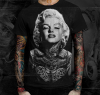
curious as to how this is done
curious as to pretty much all of it, tattoos, piercings but especially the stretched ears!
-
-
Guru
Re: curious as to how this is done
This can be accomplished in 2 parts.Part 1: Getting the base image1. Select the image you want to imprint on the T-Shirt. Copy the tattoo on top of it and adjust the opacity/blend mode to make it look realistic. 2. Piercings can be added as individual image and adding shadows underneath to have the desired effect. 3. The stretched ears can be copied from another source 4. Adjust the brightness/contrast of all layers .. merge all layers.. dessaturateYour base image is ready.Part 2: Imprint the base image on T-Shirt1. Use displacement technique (search forum on how to) to get the T-Shirts's contours and shadows on the base image. 2. Add a new layer with the base image and blend to have the desired result. 3. Mask off the areas not required 4. Add a little grain to give it more realistic look5. Free Transform->Distort adjust corners to match the lines of the T-ShirtCheers !!!
-
-
Member
Re: curious as to how this is done
you really are a walking, breathing enzcyclopedia photoshoppica
-
-
Guru
Re: curious as to how this is done
-
-
Re: curious as to how this is done
I am completely new to photoshop. I photoshopped in open eyes to a photo with closed eyes. I was finished and just trying to blend in it with the skin. This is new to me and the best way I learn is by doing. I was in the fx tool and somehow brought back the yellow circle that looked like the lasso around the eye. Now one eye has a yellow circle around it that will not go away. I have tried the basics of undo and going back to the same function I hit, but it has not been helpful. Can someone please let me know what I am supposed to do?
Thank you very much.
-
Tags for this Thread
Posting Permissions
- You may not post new threads
- You may not post replies
- You may not post attachments
- You may not edit your posts
Forum Rules
Powered by
vBulletin® Version 4.1.9
Copyright © 2013 vBulletin Solutions, Inc. All rights reserved.
Content Relevant URLs by
vBSEO 3.6.0
Copyright 2011 Photoshop Gurus Forum. All rights reserved.
All times are GMT -5. The time now is 10:49 PM.