michaelkoss
New Member
- Messages
- 3
- Likes
- 0
I am trying to make a 3D looking disc, sort of like this:
Glossy Recycling Icon | Royalty Free Stock Vector Art Illustration | iStockphoto.com
or
Throwing a Disc | Royalty Free Stock Vector Art Illustration | iStockphoto.com
However, I would like the disc to look as though it is laying flatter (more of a side shot).
Here is where I have gotten so far:
http://okcthundercast.com/media/disc.png
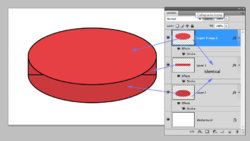
I'm fairly happy with it, but I would like the sides to look more perpendicular to the top, rather than rounded. Another example of what I'm going for is:
Yogpot Gels on Flickr - Photo Sharing!
but again, more from a side view. Can someone give me a nudge in the right direction? How can I make the sides look flat instead of curved?
Thanks a bunch!
Michael
Glossy Recycling Icon | Royalty Free Stock Vector Art Illustration | iStockphoto.com
or
Throwing a Disc | Royalty Free Stock Vector Art Illustration | iStockphoto.com
However, I would like the disc to look as though it is laying flatter (more of a side shot).
Here is where I have gotten so far:
http://okcthundercast.com/media/disc.png
I'm fairly happy with it, but I would like the sides to look more perpendicular to the top, rather than rounded. Another example of what I'm going for is:
Yogpot Gels on Flickr - Photo Sharing!
but again, more from a side view. Can someone give me a nudge in the right direction? How can I make the sides look flat instead of curved?
Thanks a bunch!
Michael