+ Reply to Thread
Page 1 of 3 123 LastLast
Results 1 to 10 of 27
  1. #1
    ASC
    ASC is offline
    Member
    Join Date
    Feb 2011
    Posts
    42
    Thanks
    0
    Thanked 0 Times in 0 Posts

    Can you help explain how to achieve this effect?

    Hi guys,

    Im a photographer and a slight newbie to photoshop. I know the basics etc but not to the level I'm about to explain...

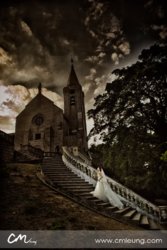
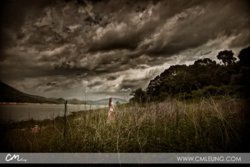
    I want to start creating Fine Art with some of my pictures for example see the following pictures from CM photographer (all credits to him for these pictures his very talented)

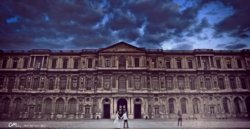


    For the above images, I'm mainly concerned with the building and the effect/texture on them. You can see in the 1st picture how the building has a very grunge effect to it. with some dark/light patches. That is the first thing I wish to learn.

    ----------------------------------

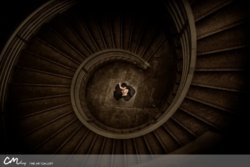
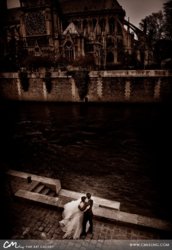
    Secondly I would like to know how to create dark, low light grunge effect like this:
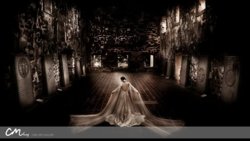


    So as you can see in the images above the light is quite low, I'm guessing a lot of its done with Dodge/Burn tools... and overal hue to get that slight purple colour?

    ----------------------------------

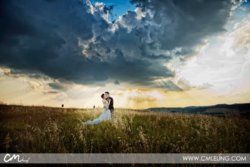
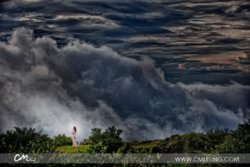
    And thirdly how to make the clouds come alive in your pictures like this:


    ----------------------------------

    I know I'm asking a LOT with all them pictures, but I'm just posting them to help get my point across better so you guys can understand what effect I'm after. Now this photographer also sells actions to achieve some of these effects in photoshop if you go on his website (see image). But It doesn't say whether the action is applied step by step so we can learn what his doing or all at one go...

    If anyone could help explain with demonstration on how to achieve any one of these effects or know of a good link/tutorial showing how to achieve them. I would be forever grateful!

    Thanks for your time and I really hope someone can help me (and others that are looking for the same effect) out.

    Thank You

  2. #2
    Guru
    Join Date
    May 2011
    Location
    Sweden
    Posts
    1,359
    Thanks
    34
    Thanked 55 Times in 54 Posts

    Re: Can you help explain how to achieve this effect?

    I would LOVE to know how to do that, but unfortunately IŽm far from that level of experience. If I should come across any tutorials on how to do things like that, I will give you the links though. Really cool stuff!

  3. #3
    Guru
    Join Date
    Aug 2011
    Location
    Sweden
    Posts
    559
    Thanks
    28
    Thanked 32 Times in 32 Posts

    Re: Can you help explain how to achieve this effect?

    For to achieve that feeling you go by the top menu: Image/Adjustments/HDR Toning. By playing with the sliders there you could achieve that crispy look. For to apply the the colors you just make a new layer on top of the photo. Set the blending mode to "Overlay" Chose a color and pick a brush and paint. Easiest is to chose one layer per color and then you could adjust the opacity on each and one of those layers until youŽll get it as you wish.
    BTC - 1D9hQP5hgGRRtYzsPd1pjA4Mfu6irodRip
    PGP - 0x13C873D5

  4. #4
    Senior Member
    Join Date
    Oct 2011
    Location
    Belgium
    Posts
    119
    Thanks
    10
    Thanked 4 Times in 4 Posts

    Re: Can you help explain how to achieve this effect?

    Yes I agree with Fenix the easier is to paint brushes of dark points, then a new layer and the point of light like white brush, just gaussian blur all that and overlay. Then play with opacity to have the render you need. I would personally finish with a fill in layer to pack all this ;-) like a dark blue on exclusion ;-)

    Hope it helps
    I am perfectly imperfect, that makes me unique !
    Nat

  5. #5
    ASC
    ASC is offline
    Member
    Join Date
    Feb 2011
    Posts
    42
    Thanks
    0
    Thanked 0 Times in 0 Posts

    Re: Can you help explain how to achieve this effect?

    Quote Originally Posted by Vafann View Post
    I would LOVE to know how to do that, but unfortunately IŽm far from that level of experience. If I should come across any tutorials on how to do things like that, I will give you the links though. Really cool stuff!
    Thanks any tutorials at all would be awesome!

    Quote Originally Posted by fenix View Post
    For to achieve that feeling you go by the top menu: Image/Adjustments/HDR Toning. By playing with the sliders there you could achieve that crispy look. For to apply the the colors you just make a new layer on top of the photo. Set the blending mode to "Overlay" Chose a color and pick a brush and paint. Easiest is to chose one layer per color and then you could adjust the opacity on each and one of those layers until youŽll get it as you wish.
    I was thinking maybe its HDR especially for the first image. Do you my chance have any tutorials/links showing this in perhaps a demonstration video?

    Quote Originally Posted by nataloran View Post
    Yes I agree with Fenix the easier is to paint brushes of dark points, then a new layer and the point of light like white brush, just gaussian blur all that and overlay. Then play with opacity to have the render you need. I would personally finish with a fill in layer to pack all this ;-) like a dark blue on exclusion ;-)

    Hope it helps
    Thanks for your comment appreciate it. I will try this out but its kinda heard reading about something then trying it as opposed to actually watching a tutorials demonstration. Would you by any chance of any links...


    I took few pictures of a similar type building (as picture 1) with my Canon 5D, just so I can practise the effect within Photoshop. If you guys like I can post the image here If you wish to create a tutorial on it and show how you might create a similar effect?

    -ASC

  6. #6
    Senior Member
    Join Date
    Oct 2011
    Location
    Belgium
    Posts
    119
    Thanks
    10
    Thanked 4 Times in 4 Posts

    Re: Can you help explain how to achieve this effect?

    check lynda.com or youtube ;-) sure you will find some
    I am perfectly imperfect, that makes me unique !
    Nat

  7. #7
    Guru
    Join Date
    May 2011
    Location
    Sweden
    Posts
    1,359
    Thanks
    34
    Thanked 55 Times in 54 Posts

    Re: Can you help explain how to achieve this effect?

    Quote Originally Posted by ASC View Post
    Thanks any tutorials at all would be awesome!


    I was thinking maybe its HDR especially for the first image. Do you my chance have any tutorials/links showing this in perhaps a demonstration video?


    Thanks for your comment appreciate it. I will try this out but its kinda heard reading about something then trying it as opposed to actually watching a tutorials demonstration. Would you by any chance of any links...


    I took few pictures of a similar type building (as picture 1) with my Canon 5D, just so I can practise the effect within Photoshop. If you guys like I can post the image here If you wish to create a tutorial on it and show how you might create a similar effect?

    -ASC
    I think it would be really cool if you posted the image to try and practice on!

  8. #8
    Senior Member
    Join Date
    Oct 2011
    Location
    UK
    Posts
    105
    Thanks
    1
    Thanked 7 Times in 7 Posts

    Re: Can you help explain how to achieve this effect?

    I agree with what everyone else has been saying but I'd use the burn tool to darken the image instead of using a regular brush and overlay. You should play with the levels a bit to get a higher contrast and lower the saturation. Also the clouds are from a different image, you can tell on the last picture because there's a slight glow from the bushes. This is pretty advanced stuff so you should start with some beginner tutorials.

  9. #9
    ASC
    ASC is offline
    Member
    Join Date
    Feb 2011
    Posts
    42
    Thanks
    0
    Thanked 0 Times in 0 Posts

    Re: Can you help explain how to achieve this effect?

    Boomawoom, thanks for your comment. I don't know if the clouds are from a different image or not. Only reason I say that is because of this video:

    CM Actions on Vimeo

    You get to see what the action's do, and as you can see in the 'BEFORE' images the clouds are already there in all of them its just a matter of enhancing them and making them 'pop' out.

    @Vafann, I will post the image as soon as I get the camera back off a friend. Should be Thursday/Friday.

  10. #10
    Senior Member
    Join Date
    Oct 2011
    Location
    UK
    Posts
    105
    Thanks
    1
    Thanked 7 Times in 7 Posts

    Re: Can you help explain how to achieve this effect?

    Ah right, ok I was wrong and if it's all done by an action then I don't think they'll be any brush work either. Best thing I'd suggest is to look at some HDR tutorials and you could get a similar effect. There's a few here.


Tags for this Thread

Posting Permissions

  • You may not post new threads
  • You may not post replies
  • You may not post attachments
  • You may not edit your posts
Powered by vBulletin® Version 4.1.9
Copyright © 2012 vBulletin Solutions, Inc. All rights reserved.
Content Relevant URLs by vBSEO 3.6.0
Copyright 2011 Photoshop Gurus Forum. All rights reserved.
All times are GMT -5. The time now is 07:25 AM.
vBulletin Skins