
Photoshop Gurus Forum
Welcome to Photoshop Gurus forum. Register a free account today to become a member! It's completely free. Once signed in, you'll enjoy an ad-free experience and be able to participate on this site by adding your own topics and posts, as well as connect with other members through your own private inbox!
You are using an out of date browser. It may not display this or other websites correctly.
You should upgrade or use an alternative browser.
You should upgrade or use an alternative browser.

Hoogle
Guru
- Messages
- 7,940
- Likes
- 2,488
Sorry that was not a tutorial it was a question all you do select a background colour and a forground colour open up the brush panel go to colour dynamis you will see a slider bar at the top foreground to background slide that all the way up and then play with all the different sliders for colour effects and brush spaceing.
However I want to know how to limit the colours just to 5
However I want to know how to limit the colours just to 5

Vafann
Guru
- Messages
- 1,334
- Likes
- 367
Sorry that was not a tutorial it was a question all you do select a background colour and a forground colour open up the brush panel go to colour dynamis you will see a slider bar at the top foreground to background slide that all the way up and then play with all the different sliders for colour effects and brush spaceing.
However I want to know how to limit the colours just to 5
Oh lol, I have no idea lol

 .
.
Hoogle
Guru
- Messages
- 7,940
- Likes
- 2,488
Yes but that wouldnt be continous would it for example I want it specifically 1 colour per 1 brush stroke for example
I would want it to come out like
red,blue,green,red,purple,red,green,red,purple and so on no matter what direction I was painting in
Where as a gradient will colour everything in the same coloum the same colour wouldnt it.
See that was my first option but I found did not matter where I painted it would always be the same colour depending where you were painting n the screen. Unless I have misunderstood the gradient tool and there is an option for continous flow I cant seem to find anything similar.
Here is what I mean Ok where the colours are that is wherever you paint in those sections that is what the colour will be that is done with a fine brush painting in all directions until i filled the canvas up.

But what I need is a brush where I can evenly space it without having to change the colour after each stroke to get this effect ok not these colours and I need it to be more even hence trying to get it in the brush dynamics.

I would want it to come out like
red,blue,green,red,purple,red,green,red,purple and so on no matter what direction I was painting in
Where as a gradient will colour everything in the same coloum the same colour wouldnt it.
See that was my first option but I found did not matter where I painted it would always be the same colour depending where you were painting n the screen. Unless I have misunderstood the gradient tool and there is an option for continous flow I cant seem to find anything similar.
Here is what I mean Ok where the colours are that is wherever you paint in those sections that is what the colour will be that is done with a fine brush painting in all directions until i filled the canvas up.
But what I need is a brush where I can evenly space it without having to change the colour after each stroke to get this effect ok not these colours and I need it to be more even hence trying to get it in the brush dynamics.
Vafann
Guru
- Messages
- 1,334
- Likes
- 367
I found this, but you probably already know this.
Photoshop Brushes Tutorial - Brush Dynamics - Color Dynamics
Photoshop Brushes Tutorial - Brush Dynamics - Color Dynamics
Vafann
Guru
- Messages
- 1,334
- Likes
- 367
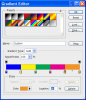
May be I didn't understand something but my post does just you want. I'm not talking about Gradient TOOL, I'm talking about Gradient map adjustment layer over your paint layer.
Just create the gradient for Gradient map and paint with your brush on painting layer(with Black/White colors).
I know my English is not perfect, but read my post again, please.
Just create the gradient for Gradient map and paint with your brush on painting layer(with Black/White colors).
I know my English is not perfect, but read my post again, please.