1Likes
-
1
Post By bahamafotoshoppe
-
Senior Member
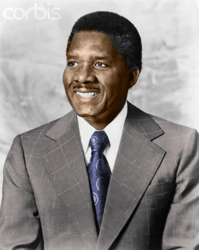
i finally tried recolorization
It took me long enough . 41 mins
It went from this
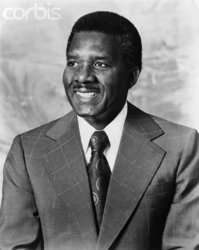
To This
-
-
Guru
Re: i finally tried recolorization
Nice job but you missed the left upper forehead area and top part of ear
-
-
Senior Member
Re: i finally tried recolorization
I look at it closely and just saw. little nips . I'm gonna fix thanks
-
-
Member
Re: i finally tried recolorization
Colorizing BW images is tricky. I think a natural first instinct is to go for a color fill. This results in a wierd monotone sort of look.
flesh tone is made up of many different colors. Hilights need to be treated differently than shadows, same goes for midtones. I try to add a little color to eye whites and teeth to get rid of that grey cold look
I worked this image in a series of adjustment layers, masking out each element. Try using color range select, or the "blend if" sliders in the layerstyle window to fade the main color modifications out of the shadows and hilights.
Keep trying, you've got a good start.
-
-
Senior Member
Re: i finally tried recolorization
Thanks I'm going to do another one I'll keep this in mind this was my first ever i hope to do many more
-
-
Senior Member
Re: i finally tried recolorization
Howd you change the tie color ?
-
-
Member
Re: i finally tried recolorization
I did the tie color change with a curves adjustment layer.
-
-
Senior Member
Re: i finally tried recolorization

HUH i expected this to be bigger. But anyways i tried different styles on this one. I'm learning . Thanks guys
-
Tags for this Thread
Posting Permissions
- You may not post new threads
- You may not post replies
- You may not post attachments
- You may not edit your posts
Forum Rules
Powered by
vBulletin® Version 4.1.9
Copyright © 2012 vBulletin Solutions, Inc. All rights reserved.
Content Relevant URLs by
vBSEO 3.6.0
Copyright 2011 Photoshop Gurus Forum. All rights reserved.