+ Reply to Thread
Results 1 to 6 of 6

Thread: smooth edges

  1. #1
    Junior Member
    Join Date
    Dec 2011
    Posts
    25
    Thanks
    3
    Thanked 0 Times in 0 Posts

    smooth edges

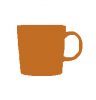
    Im trying to make some silhouette of objects.

    I use the majic wand tool to get the shape and fill it in with a colour...

    The end result is very jaggy... any ideas how i can make the edges smooth?

    smooth edges-mug.jpg

  2. #2
    Forum Mod
    Join Date
    Jun 2011
    Location
    Uk
    Posts
    5,601
    Thanks
    85
    Thanked 449 Times in 424 Posts

    Re: smooth edges

    You could try another selection technique make a selection then go into quick mask mode to add to it and tidy up. Or you could use quick selection tool rather than magic wand. Or any other selection tool something simple like that could be best with the pen tool.
    If the cup is 1 particular colour you could try select colour range.

  3. #3
    Junior Member
    Join Date
    Dec 2011
    Posts
    25
    Thanks
    3
    Thanked 0 Times in 0 Posts

    Re: smooth edges

    Thanks for advise but it still looks jaggie

    jarrattperkins.com <- you can see it here

  4. #4
    Forum Mod
    Join Date
    Jun 2011
    Location
    Uk
    Posts
    5,601
    Thanks
    85
    Thanked 449 Times in 424 Posts

    Re: smooth edges

    Where are you making the selection from you could tidy that up by using a small brush with 100 % hardness at 1 edge click it and holkd the mouse doen holding shift and then paint over the edge with the shift key held down it will draw a perfectly straight edge sidying up the jagged parts the handle will be different.

  5. #5
    Guru
    Join Date
    Mar 2010
    Location
    Mesa, Arizona
    Posts
    1,107
    Thanks
    0
    Thanked 71 Times in 70 Posts

    Re: smooth edges

    Learn to use the pen tool with a vector mask.

  6. #6
    Forum Mod
    Join Date
    Jun 2011
    Location
    Uk
    Posts
    5,601
    Thanks
    85
    Thanked 449 Times in 424 Posts

    Re: smooth edges

    You could quite easily do this using standard custom shapes use rounded rectangle as your body eliptical for the handle and then do another eliptical but set the mode to subtract and you will get something like this but obviously you will need to shape it more to your liking.
    smooth edges-untitled-1.png


Tags for this Thread

Posting Permissions

  • You may not post new threads
  • You may not post replies
  • You may not post attachments
  • You may not edit your posts
Powered by vBulletin® Version 4.1.9
Copyright © 2012 vBulletin Solutions, Inc. All rights reserved.
Content Relevant URLs by vBSEO 3.6.0
Copyright 2011 Photoshop Gurus Forum. All rights reserved.
All times are GMT -5. The time now is 08:43 AM.
vBulletin Skins