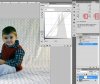
help me fix the most poorly lit picture ever? please?! :)
I'm embarassed to even admit that i took this picture, but i need help! this was my first time attempting indoor "studio" pictures and i was using umbrella lights for the first time. my results are horrible! (they all look pretty much like this) can you offer any help on to how to fix this picture in photoshop? when i add a cooling filter i get blue spots in the background before i get rid of the yellow. when i lighten it it looks like a big glare. i dont know what to do! detailed instructions would be most helpful.
also, if you can offer help on how to not do what i did wrong in the first place, that would be appreciated too!
thank you!
Re: help me fix the most poorly lit picture ever? please?! :)
What do you want to do to the photo? I would say a brightness adjustment layer, if you want the subject brighter. You can add a layer mask and paint the background to keep it as is.
Re: help me fix the most poorly lit picture ever? please?! :)
Ok not a great job but all i did was a quick exposure adjustment layer a quick clone layer for backdrop and then on original layer went to image >adjustment > shadow highlights to tweak them.
The advantage of using an exposure adjustment layer is that you can paint out the hot spots from where you have corrected the exposure but some areas are over done.
I would suggest using more reflective material or a simple reflector on the ground in front of your subject to reflect the light back up I use to just use budget aluminium foil that cost less than a dollar for a huge roll. If you are photographing children I would reccomend a gold reflector it is a nicer effect.
And move your lights closer I dont know what umbrellas your using if they are reflective or normal white 1s possibly aim your light so it is going through the umbrella rather than reflecting back on the model for example point the outside of the umbrella at the model rather than the traditional inside. This basically turns your umbrella into a soft box but obviously will not work if it is a reflective umbrella.
I also use to skip my umbrella hang a bed sheet that was white over a clothes rack and put a spotlight to shoot through the sheet giving a nice large soft light. Just dont have the spotlight\modelling lamp\ flash head\gun to close to the sheet or you will get hot spots.
Re: help me fix the most poorly lit picture ever? please?! :)
True but as it was more instructional rather than doing the job for them as requested the actual colour and white balance is a personal preference. The golden look is getting quite fashionable at the moment by all means mine is not meant to be the final result. If its Adults I prefer the white out look for backgrounds but with childrent I like the warmth if that makes sense.
I also acknowledge the fact my sample is over exposed before we point that out as well lol.
Re: help me fix the most poorly lit picture ever? please?! :)
If you do the image > adjustment >shadow highlights adjustment and then go to image Auto tone this is what you get so you could just work on that and tweak it up ie tidy the background up.
But yes Ivan when it comes to photography I always use white balance in camera raw or lightroom if I have it wrong on my initial shot it is a very powerfull tool and cant live without it.
Re: help me fix the most poorly lit picture ever? please?! :)
Just fooling around with an idea. It isn't easy to comment on your lighting without knowing what kind you are using, but it looks like the lighting was too much to the sides. Try setting your key light and fill at about 45° to the subject. The fill should be a 50% of the key. Adjust the distance as needed. If you have a third light you can use (above) it as a hair light, or slightly behind the subject pointing towards the head.
You need to get the subject farther from the background and use a large aperature for a shallow depth of field to blur the background, 5 or 6 usually is about right.