
Photoshop Gurus Forum
Welcome to Photoshop Gurus forum. Register a free account today to become a member! It's completely free. Once signed in, you'll enjoy an ad-free experience and be able to participate on this site by adding your own topics and posts, as well as connect with other members through your own private inbox!
You are using an out of date browser. It may not display this or other websites correctly.
You should upgrade or use an alternative browser.
You should upgrade or use an alternative browser.
Save for web and devices colour change
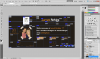



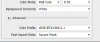
I hope this helps: The Mysterious “Save For Web” Color Shift | Viget Inspire
Here another article that a lot of people refer to: SRGB 2.2 GAMMA COLOR SPACE Target Color Space for the Internet
And if you still can't solve it, then just make a 1x1 pixel image, save it with the same settings and color as your other images and use that as a tiling background, instead of using an HTML color code and your problem should be solved.
And if you still can't solve it, then just make a 1x1 pixel image, save it with the same settings and color as your other images and use that as a tiling background, instead of using an HTML color code and your problem should be solved.
Last edited: