
+ Reply to Thread
Results 1 to 8 of 8
  1. #1
    Newbie
    Join Date
    Jan 2012
    Posts
    3
    Thanks
    0
    Thanked 0 Times in 0 Posts

    Any ideas on how to get the effect shown in this picture? Like TV faded colors

    Hi Guys,

    I've been trying to get this effect on photoshop. I thought about creating 3 layers with the same image and having the images slightly unaligned (to give that ghost or faded trace). Then changing the hue in blue, red and yellow (one for each color shown on the picture) and for the natural colors (face) adding a 4th layer with an original image but desaturating it just a bit. I tried this idea but couldn't get the effect so I want see if any of you have better ideas.

    Note: I don't care about the horizontal lines shown on the pic, just to get the faded effect or those 3 colors.

    Thank you
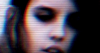
    Attached Thumbnails Attached Thumbnails Any ideas on how to get the effect shown in this picture? Like TV faded colors-tvfade.png  


  2. #2
    Newbie
    Join Date
    Jan 2012
    Posts
    3
    Thanks
    0
    Thanked 0 Times in 0 Posts

    Re: Any ideas on how to get the effect shown in this picture? Like TV faded colors

    By the way... i did add transparency on those layers.

  3. #3
    Junior Member
    Join Date
    Jan 2012
    Posts
    6
    Thanks
    0
    Thanked 0 Times in 0 Posts

    Re: Any ideas on how to get the effect shown in this picture? Like TV faded colors

    Quote Originally Posted by oskarphoto View Post
    Hi Guys,

    I've been trying to get this effect on photoshop. I thought about creating 3 layers with the same image and having the images slightly unaligned (to give that ghost or faded trace). Then changing the hue in blue, red and yellow (one for each color shown on the picture) and for the natural colors (face) adding a 4th layer with an original image but desaturating it just a bit. I tried this idea but couldn't get the effect so I want see if any of you have better ideas.

    Note: I don't care about the horizontal lines shown on the pic, just to get the faded effect or those 3 colors.

    Thank you
    isn't there a filter that creates lines? I haven't used PS in a while (gimp user) but I am pretty sure that there is a tool that will erase every other row of an image.

    try duplicating the layer, find that effect, use it, and then set the layer mode to overlay.

  4. #4
    Newbie
    Join Date
    Jan 2012
    Posts
    3
    Thanks
    0
    Thanked 0 Times in 0 Posts

    Re: Any ideas on how to get the effect shown in this picture? Like TV faded colors

    Tstandiford: Thank you for your input... however I said is not the lines what interest me. And I did try to find a filter but since that is obvious i thought it wasn't necessary to state. Do you have any technical ideas on how to get that effect going?

  5. #5
    Power User
    Join Date
    Dec 2011
    Location
    Netherlands
    Posts
    343
    Thanks
    14
    Thanked 17 Times in 17 Posts

    Re: Any ideas on how to get the effect shown in this picture? Like TV faded colors

    hm, no idea how to create this, but the image looks prety cool with green/red 3D glasses on ^^

  6. #6
    Forum Mod
    Join Date
    Jun 2011
    Location
    Uk
    Posts
    5,606
    Thanks
    85
    Thanked 449 Times in 424 Posts

    Re: Any ideas on how to get the effect shown in this picture? Like TV faded colors

    this actually looks like it was done in after effects using a filter called twitch

  7. #7
    Junior Member
    Join Date
    Jan 2012
    Location
    Greensboro
    Posts
    11
    Thanks
    0
    Thanked 0 Times in 0 Posts

    Re: Any ideas on how to get the effect shown in this picture? Like TV faded colors

    Pretty cool style, if you figure it out please post

  8. #8
    Senior Member
    Join Date
    Aug 2010
    Location
    MD
    Posts
    118
    Thanks
    1
    Thanked 11 Times in 11 Posts

    Re: Any ideas on how to get the effect shown in this picture? Like TV faded colors

    It seems like a "Scanline" effect with harsh contrast by a mirrored gaussian blurred overlay & color distortion, which is what low quality analog televisions usually produce, Google it. I could tell you how to do it but there are tutorials out there that will probably be easier for you than what I would tell you, and it saves meh the time lol.
    Last edited by DoTTGaMMa; 01-15-2012 at 05:45 PM.


Tags for this Thread

Posting Permissions

  • You may not post new threads
  • You may not post replies
  • You may not post attachments
  • You may not edit your posts
Powered by vBulletin® Version 4.1.9
Copyright © 2012 vBulletin Solutions, Inc. All rights reserved.
Content Relevant URLs by vBSEO 3.6.0
Copyright 2011 Photoshop Gurus Forum. All rights reserved.
All times are GMT -5. The time now is 09:44 AM.
vBulletin Skins