+ Reply to Thread
Page 1 of 2 12 LastLast
Results 1 to 10 of 14
Like Tree3Likes

Thread: Need a little helP w/ text manipulation

  1. #1
    Junior Member
    Join Date
    Jan 2012
    Location
    A, A
    Posts
    7
    Thanks
    0
    Thanked 0 Times in 0 Posts

    Question Need a little helP w/ text manipulation

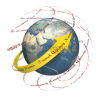
    I would like to replace the arrow with the Company Name following the same shape and contour, Please help!

    Need a little helP w/ text manipulation-stock-photo-circle-world-isolated-white-background-55459945.jpg

  2. #2
    Junior Member
    Join Date
    Jan 2012
    Location
    A, A
    Posts
    7
    Thanks
    0
    Thanked 0 Times in 0 Posts

    Re: Need a little helP w/ text manipulation

    * Not Shutterstock, The name of the Travel agency.

  3. #3
    Member
    Join Date
    Jan 2012
    Location
    Surrey, UK
    Posts
    30
    Thanks
    0
    Thanked 2 Times in 2 Posts

    Re: Need a little helP w/ text manipulation

    Did you want to have the text in the arrow, or get rid of the arrow completely?

    Baring in mind, Im very new to this, and some of the Guru's will probably have much better ways, I would write the text and then use Filter- Distort- Spherize. Ive done a sample to see what you think. Here I had to use 2 filters on the word Travel. This only took me a few minutes, so for a professional job, and a bit more time spent, it could probably look better.

    Need a little helP w/ text manipulation-stock-photo-circle-world-isolated-white-background-55459945.jpg

  4. #4
    Forum Mod
    Join Date
    Jun 2011
    Location
    Imperial Beach, CA, US
    Posts
    3,566
    Thanks
    97
    Thanked 218 Times in 217 Posts

    Re: Need a little helP w/ text manipulation

    Interesting approach Sparky. I would have suggested just using the pen tool to create the path, but the spherize gives it a very interesting perspective. Good job.

    Of course giftdesigngroup, I hope you are talking about the concept of the name going around the globe and intend to create it yourself. It is theft to use work that is watermarked such as this one.

  5. #5
    Power User
    Join Date
    Mar 2009
    Location
    Russia
    Posts
    220
    Thanks
    2
    Thanked 19 Times in 18 Posts

    Re: Need a little helP w/ text manipulation

    This one I did with 3D tools in PS CS5 Extended:

    Need a little helP w/ text manipulation-travel.png
    Easy one

  6. #6
    Junior Member
    Join Date
    Jan 2012
    Location
    A, A
    Posts
    7
    Thanks
    0
    Thanked 0 Times in 0 Posts

    Re: Need a little helP w/ text manipulation

    i wanted to replace the arrow totally and make the text the arrow

  7. #7
    Junior Member
    Join Date
    Jan 2012
    Location
    A, A
    Posts
    7
    Thanks
    0
    Thanked 0 Times in 0 Posts

    Re: Need a little helP w/ text manipulation

    Need a little helP w/ text manipulation-world-travel.jpg
    Ibclare - im not that much of a newbie lol

  8. #8
    Junior Member
    Join Date
    Jan 2012
    Location
    A, A
    Posts
    7
    Thanks
    0
    Thanked 0 Times in 0 Posts

    Re: Need a little helP w/ text manipulation

    any takers?

  9. #9
    Forum Mod
    Join Date
    Jun 2011
    Location
    Imperial Beach, CA, US
    Posts
    3,566
    Thanks
    97
    Thanked 218 Times in 217 Posts

    Re: Need a little helP w/ text manipulation

    Quote Originally Posted by giftedesigngroup View Post
    Ibclare - im not that much of a newbie lol

    sorry!

    You didn't say. I didn't ask . . .

  10. #10
    Forum Mod
    Join Date
    Jun 2011
    Location
    Imperial Beach, CA, US
    Posts
    3,566
    Thanks
    97
    Thanked 218 Times in 217 Posts

    Re: Need a little helP w/ text manipulation

    Quote Originally Posted by giftedesigngroup View Post
    i wanted to replace the arrow totally and make the text the arrow
    meaning ... you want the text to wrap around the globe as well as warp into the shape of the arrowhead? Or just take the direction of the arrow? What about the long tail that twists ribbonlike? Do you want any text curling there also ... The way Sparky and SCTRWD have it placed, is that how you want the text to be positioned? It seems like they have the right solutions. They have created the text effects independent of the arrow (I believe) and have made the text curve around the globe? Isn't that what you want?


Posting Permissions

  • You may not post new threads
  • You may not post replies
  • You may not post attachments
  • You may not edit your posts
Powered by vBulletin® Version 4.1.9
Copyright © 2012 vBulletin Solutions, Inc. All rights reserved.
Content Relevant URLs by vBSEO 3.6.0
Copyright 2011 Photoshop Gurus Forum. All rights reserved.
All times are GMT -5. The time now is 09:59 AM.
vBulletin Skins