
-
Guru
What Photoshop improvements would be good for this drawing?
The Drawing i am about to show is part of my art project, it took me 2&1/2 hours to complete but it's still not there yet me thinks, it needs something but i think it needs something in photoshop not on paper. so i'm going to leave you with the drawing, and ask you very kindly about what to do with it in photoshop (APART FROM: penning it in, i already know that will be on the list of things to do)
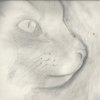
I'm not usually a fan of colour on my sketches, but if you can give an effective technique on how to add colour without making it look monotonous. i will be incredibly happy 
Thanks
-
-
Member
Re: What Photoshop improvements would be good for this drawing?
Maybe make the eye a bit sharper, or make them pop out a bit more?
At the moment it seems a bit dull (the eye not the drawing), usually with a drawing or photo I find myself drawn to the eyes of the subject but here, my eyes wonder off from it.
Basically what I'm saying is make the eyes exciting! 
Tim
-
The Following User Says Thank You to TiMmY For This Useful Post:
-
Forum Mod
Re: What Photoshop improvements would be good for this drawing?
It has a lovely, sensitive touch Zeealex.
I tentatively agree with the suggestion to make the eyes more expressive. I would say that the softness may be too much as there is little black, little contrast. I know how disconcerting it can be to get this far and work this hard then consider the next step. You don't want to ruin it. And that's the beauty of Photoshop. You can try it before you commit to it.
Anyway, it is nice enough as it is that it could stand not to have any change. Maybe the eyes could pop, but even there I say be careful not to overdue it and take away from the overall effect which is very ethereal.
Last edited by ibclare; 02-13-2012 at 11:09 PM.
-
The Following User Says Thank You to ibclare For This Useful Post:
-
Power User
Re: What Photoshop improvements would be good for this drawing?
I completely agree with the other posters here. It's really REALLY nice as it is. If you want or need to add color, you could give the background the barest wash of very pale color or put a little mauve in the shadows. I wouldn't touch the cat - he's quite wonderful.
-
The Following User Says Thank You to Sierraccr For This Useful Post:
-
Guru
Re: What Photoshop improvements would be good for this drawing?
right sorry for not responding as quickly as i would have liked, got allot on, i shall try to add in all your suggestions as soon as i've got other bits of work out of the way. thanks to you all
-
Posting Permissions
- You may not post new threads
- You may not post replies
- You may not post attachments
- You may not edit your posts
Forum Rules
Powered by
vBulletin® Version 4.1.9
Copyright © 2012 vBulletin Solutions, Inc. All rights reserved.
Content Relevant URLs by
vBSEO 3.6.0
Copyright 2011 Photoshop Gurus Forum. All rights reserved.