1Likes
-
1
Post By IamSam
-
Extracting the "text" from an image
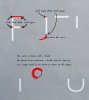
I am planning to order a custom iphone case engraved with this image:
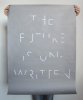
Obviously I am only interested to extract the words from the image itself.
Luxe plates (the company I am ordering from) wants a simple engravable image from this photo.
What operations should I perform to extract the text only from this photo?
I want the end result to look simple enough to be engraved by a laser printer.
-
-
Queen Bee
Re: Extracting the "text" from an image
I believe your best bet would be to create a layer above this image and trace with a pencil tool.
This is low resolution so the first thing you want to do is increase the resolution to 300. Don't worry about how any of it looks. You only need the original for tracing.
This is really easy to do for straight lines. Click on a point. Hold down the shift key and click on the next point in the straight line. Then click again, shift click, etc. When it comes to the curves, just follow them with the pencil, or you might find the brush easier. It will take you less time than to try to extract the blurry lines.
The curved lines would be less jaggy if you use the pen tool, but I don't think you have any experience with that and the brush should work OK. You can always do the whole thing, throw on a layer mask and use a hard round brush to clean up edges.
Maybe this visual will help:

Good luck and any questions, come back and let us know.
Last edited by ibclare; 11-17-2012 at 02:21 AM.
-
-
Forum Moderator
Re: Extracting the "text" from an image
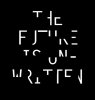
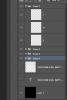
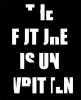
I would have just done a de saturated layer of that image, then moved sliders til you get nigh on full block black colour the removed the background, but the trouble then is edge deterioration, maybe illustrator is a go, but the pen is always mightier than any other sword.
-
-
Guru
-
-
Queen Bee
Re: Extracting the "text" from an image
Excellent approach. I never thought of masking out the type pieces. Talk about staring me right in the face!!!
-
-
Re: Extracting the "text" from an image
I actually like IamSam's method the best.
By the way the font used was "Futura"
-
-
Forum Moderator
Re: Extracting the "text" from an image
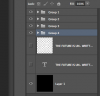
Rectangular marquee tool, remove what you don't want and fill with black.
And yes i realise it is not your chosen font.
-
Posting Permissions
- You may not post new threads
- You may not post replies
- You may not post attachments
- You may not edit your posts
Forum Rules
Powered by
vBulletin® Version 4.1.9
Copyright © 2013 vBulletin Solutions, Inc. All rights reserved.
Content Relevant URLs by
vBSEO 3.6.0
Copyright 2011 Photoshop Gurus Forum. All rights reserved.
All times are GMT -5. The time now is 09:31 PM.