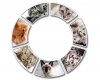
I'm new to the forum, and would like some help trying to work out how I could achieve a result like the attached graphic
I would like to learn how to create a pizza slice shaped graphic similar to the one attached. Preferably in layers so that I can change the individual photos easily. Pizza segments must have rounded corners and be equal proportions. Individual images have a thick white border and gray stroke.
I am an intermediate Photoshop user who uses layers put 'pen tool' is a mystery to me.
I should have pointed out that I am very comfortable editing and retouching photos using masks, layers, clone tools etc but graphic designs is fairly new to me
The way I would do it is draw out an equal circle. The use the pen tool to draw out one segment that when duplicated would make a perfect circle with equal spacing. That shape should be very easy to make.
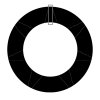
To create circular band:
selection tool> elipse> set size> 300x300 gradient > fill
select>resize>decrease size> press delete
Now to segment them: Shapes tool> line tool> weight: 20
start at the center and hold shift and release at the bottom of your screen to make a line go straight down
now press ctrl+J to coppy the layer and press ctrl+T and put the circle dot in the center of the circle by holding your alt key and rotate it by 360/ammount of segments
repeat this process untill you went full circle
select the top line layer, and then left click on the bottom line layer to select all the line layers
then right click> merge layers to put all line layers into one layer.
Now ctrl+left click the layer icon to select the outline of the layer go back to your circle layer and press delete to cut out the lines,
then hide the lines layer.
make a new layer with ctrl+shift+n Now ctrl+left click the layer icon of the circle,
and then go to edit> stroke> white>center> 5px
double click the layer> drop shadow to create the white edge around the photos with shadow
now take each photo and place it roughtly over the segment layer, make sure it fills the whole segment but doenst cover a different segment, it doesnt matter if the photos go over the edges.
now select the photo layer right above the circle layer and press ctrl+g, do this for all the photolayers. work from bottom to top
Yes, I agree. Only I think it would be easiest to use the shape tool and make concentric circles, making them the exact outer and inner dimensions you want for containing the whole "pizza" shape. But first thing is that I would draw my guides in the area I need to make points meet. This may take a bit of math but is worth it. Don't "eye" it no matter how good you think you can do it.
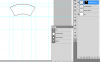
Here are some pictures of what I did. They may not be clear at first, so ask away.
Use the pen tool. This involves the most rudimentary understanding. Radiating from the center, take the line through to the upper border, then go around and connect to form this slice. Connect the dot and pull back to make the arc.
Now, I have just figured out how I would do this. Number one, this may not be the best nor easiest way, and Number 2, this being PS, there are always multiple ways to do the same thing.
Next, merge all layers and activate the slice path (ctl/cmd click the path), invert the selection and mask the layer. Now active the circle paths, invert and fill the mask with black. You may have to move the selection (activate a selection tool like the lasso), be sure the move tool is selected, and move the circle selection to the middle of the stroke. It doesn't matter because you can stroke the pizza slice again later to your desired width.
I don't know why my attachments aren't showing up. I had some trouble loading the images to begin with, but if you click on the link, it should show the image. At least it does for me.
Oh, btw, you'll see a path on the image called slice. Ignore it. It was a failed experiment!