
Native Son
New Member
- Messages
- 3
- Likes
- 0
Firstly, I'm new to this forum and really look forward to learning and participating. I've been working with PS for about two years.
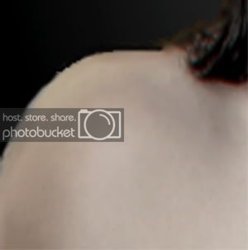
I've been unable to get this cropped shoulder smooth against the black ground; that's the model's hair in the upper right corner falling onto her collarbone. (I can't show the entire photo as it includes partial nudity). I selected it from a busy bright background with extraction. I figured I'd be able to sharpen it at the end, but that didn't work precisely. I've tried Unsharp Masking in Channels, heal & stamp tools, even using a black pencil, but this is still my best result.
I don't need to alter any other part of the photo.
Any ideas? Thanks in advance for your help with this.
Any ideas? Thanks in advance for your help with this.
I've been unable to get this cropped shoulder smooth against the black ground; that's the model's hair in the upper right corner falling onto her collarbone. (I can't show the entire photo as it includes partial nudity). I selected it from a busy bright background with extraction. I figured I'd be able to sharpen it at the end, but that didn't work precisely. I've tried Unsharp Masking in Channels, heal & stamp tools, even using a black pencil, but this is still my best result.
I don't need to alter any other part of the photo.
Any ideas? Thanks in advance for your help with this.
Any ideas? Thanks in advance for your help with this.