doomforyou
Member
- Messages
- 5
- Likes
- 0
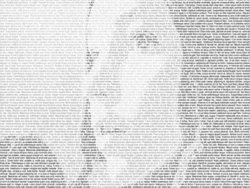
I came across an awesome picture awhile back and I've been trying to replicate it ever since. This is the image, by Gui Borchert.
http://www.guiborchert.com/play/texturizer/04.jpg Gui Borchert calls it type texturising.
The only other similar concept I've encountered is this:Creating A Text Montage - Adobe Photoshop Special Effects - Adobe Photoshop Software
The later seems to be the easier to achieve but I was wondering if there is a way to do the former. Can anyone help?
http://www.guiborchert.com/play/texturizer/04.jpg Gui Borchert calls it type texturising.
The only other similar concept I've encountered is this:Creating A Text Montage - Adobe Photoshop Special Effects - Adobe Photoshop Software
The later seems to be the easier to achieve but I was wondering if there is a way to do the former. Can anyone help?