+ Reply to Thread
Page 1 of 2 12 LastLast
Results 1 to 10 of 12
  1. #1
    Junior Member
    Join Date
    Apr 2011
    Posts
    16
    Thanks
    0
    Thanked 0 Times in 0 Posts

    How do I make a picture look 3D in photoshop?

    For example, I had a picture of a man with a background, And I just wanted the man to be 3D?
    how would I do that?
    Last edited by Anna Hussie; 04-21-2011 at 11:22 PM.

  2. #2
    Forum Mod
    Join Date
    Mar 2002
    Location
    Here... ?
    Posts
    4,997
    Thanks
    10
    Thanked 191 Times in 189 Posts

    Re: How do I make a picture look 3D in photoshop?

    One simple way is to isolate the man on a new layer and add a shadow behind him.....

  3. The Following User Says Thank You to dv8_fx For This Useful Post:

    gfx3d (11-29-2011)

  4. #3
    Junior Member
    Join Date
    Nov 2011
    Posts
    7
    Thanks
    1
    Thanked 0 Times in 0 Posts

    Re: How do I make a picture look 3D in photoshop?

    doesnt always look realistic though

  5. #4
    Banned
    Join Date
    Nov 2011
    Location
    Croatia
    Posts
    66
    Thanks
    2
    Thanked 8 Times in 8 Posts

    Re: How do I make a picture look 3D in photoshop?

    Play with lightning, burn and dodge tool.
    Try bevel and emboss for some radical effects.

  6. #5
    Power User
    Join Date
    Dec 2011
    Location
    Ohio
    Posts
    242
    Thanks
    23
    Thanked 7 Times in 7 Posts

    Re: How do I make a picture look 3D in photoshop?

    Depending on your version of Ps, there's usually an easy way and a not so easy way. With that said, if you have CS5 Extended and the hardware to back it up you can always use the 3D tools to do what you want. If you want to isolate a certain portion of an image, photo. whatever you're probably best to use the quick selection tool located underneath the majic wand tool. I have found it to be the best tool to cutting out complex shapes such as a person due to the many lines and curves. Once your done with your selection, cut and paste (Ctrl +X, Ctrl + V for PC, don't know the MAC shortcuts) Now it's anyone's guess which of the 3D tools you might want to use from here on out. But I will say that you can do amazing things with the 3D Repousse tool located in the 3D menu of Photoshop Extended. Attached is the most basic of things that can be done with this option. Imagine what can be done with a little effort.
    Attached Thumbnails Attached Thumbnails How do I make a picture look 3D in photoshop?-repousse.jpg  


  7. #6
    Junior Member
    Join Date
    Jan 2012
    Posts
    13
    Thanks
    0
    Thanked 0 Times in 0 Posts

    Re: How do I make a picture look 3D in photoshop?

    Hi Guys,
    I am new one in Photoshop. I want to also learn this thing so anyone has tutorial or tricks for this so please help me. wait for good stuff.

  8. #7
    Power User
    Join Date
    Jan 2012
    Location
    Sydney, Australia
    Posts
    305
    Thanks
    0
    Thanked 32 Times in 32 Posts

    Re: How do I make a picture look 3D in photoshop?

    Quote Originally Posted by annarobert View Post
    Hi Guys,
    I am new one in Photoshop. I want to also learn this thing so anyone has tutorial or tricks for this so please help me. wait for good stuff.
    post an image that you think doesnt look 3D and someone might help and give advice.

  9. #8
    Silly Trucker
    Join Date
    May 2011
    Location
    Trucking the big roads, dust and all.
    Posts
    4,564
    Thanks
    44
    Thanked 228 Times in 223 Posts

    Re: How do I make a picture look 3D in photoshop?

    Just playing with what i have got in the shop box.
    How do I make a picture look 3D in photoshop?-fingerroll.gif ​sort of 3D...


  10. #9
    Member
    Join Date
    Apr 2012
    Posts
    58
    Thanks
    1
    Thanked 11 Times in 11 Posts

    Re: How do I make a picture look 3D in photoshop?

    Sometimes its easy to look at an image and say if it looks 2d or 3d but to describe or put in words exactly why might be a little bit more difficult than that. There can be a number of reasons that make an image look 3d or 2d even though essentially everything you see is on a 2d flat plane called you computer screen. So unless youre talking about stereoscopic or anaglyph images everything is in fact technically 2d. So the only thing we can do is to create the illusion of 3d. Okay so by now i assume you are more confused than what you were before starting this thread?! :P

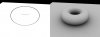
    But seriously lot of factors come into play here. How an object is shaded... how the lighting affects it... Perspective... Relation to other objects in the image... color... etc etc etc... bla bla bla... So once you start adding in these factors, your image will transform from a 2d looking image to a more 3d version. A simple example i just put together quickly below shows how adding shading or shadowing or lighting or whatever you'd like to call it makes a big difference in the following picture:
    How do I make a picture look 3D in photoshop?-2d3dcomparison.jpg

    So in the same way you can try looking into these factors one by one and try applying it to your source image. That way you should get some results.

    Here's another comparison of 2 superheroes in case my previous image was too boring for you. :P You can see how its pretty much the same frame but one is way more 3dimensional than the other.

    How do I make a picture look 3D in photoshop?-superman.jpg

  11. #10
    Member
    Join Date
    Apr 2012
    Posts
    38
    Thanks
    0
    Thanked 3 Times in 3 Posts

    Re: How do I make a picture look 3D in photoshop?

    3D? You mean anaglyph?


Tags for this Thread

Posting Permissions

  • You may not post new threads
  • You may not post replies
  • You may not post attachments
  • You may not edit your posts
Powered by vBulletin® Version 4.1.9
Copyright © 2012 vBulletin Solutions, Inc. All rights reserved.
Content Relevant URLs by vBSEO 3.6.0
Copyright 2011 Photoshop Gurus Forum. All rights reserved.
All times are GMT -5. The time now is 08:53 AM.
vBulletin Skins