+ Reply to Thread
Page 1 of 2 12 LastLast
Results 1 to 10 of 11
  1. #1
    Junior Member
    Join Date
    Aug 2011
    Posts
    8
    Thanks
    0
    Thanked 0 Times in 0 Posts

    Unhappy Need help texturing a helicopter

    Hey,

    A friend has made a 3d model of a Black Hawk helicopter in Blender and gave it to me for doing the texturing, because he's not so in Photoshop.
    I have found some tutorials to texture simple things such as barrels, barriers and blocks, but I just fail to texture a helicopter in Photoshop. My problem is, that I have these textures ( cgtextures.com (Metal - Aircraft Panels) ) and I have got no idea how I can get these on the helicopter surface without ugly stretching and copying.

  2. #2
    Guru
    Join Date
    Jul 2009
    Location
    right in front of you
    Posts
    5,906
    Thanks
    23
    Thanked 147 Times in 144 Posts

    Re: Need help texturing a helicopter

    Nice textures at that site, perhaps putting up a picture of the chopper would get more replies (ideas) for you.

  3. #3
    Junior Member
    Join Date
    Aug 2011
    Posts
    8
    Thanks
    0
    Thanked 0 Times in 0 Posts

    Re: Need help texturing a helicopter

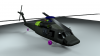
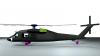
    Need help texturing a helicopter-untitled.001.pngNeed help texturing a helicopter-untitled.png
    - Pictures from the helicopter in an earlier stage than it is now; colored, to see which parts are where.


    My main problem is to get the textures fit with the helicopter shape, without ugly stretching and multiplying the standard textures I try to use.

  4. #4
    Guru
    Join Date
    Jul 2011
    Location
    on a computer... duuh
    Posts
    1,331
    Thanks
    90
    Thanked 40 Times in 38 Posts

    Re: Need help texturing a helicopter

    i've got a couple of Blackhawk textures from some games i play if that helps, if you want to i can post a few up and you can use them as a guide.
    and if i can get in contact with one of my friends in Finland, she could probably help you out
    Last edited by Zeealex; 08-13-2011 at 02:52 PM.

  5. #5
    Junior Member
    Join Date
    Aug 2011
    Posts
    8
    Thanks
    0
    Thanked 0 Times in 0 Posts

    Thumbs up Re: Need help texturing a helicopter

    Quote Originally Posted by Zeealex View Post
    i've got a couple of Blackhawk textures from some games i play if that helps, if you want to i can post a few up and you can use them as a guide.
    and if i can get in contact with one of my friends in Finland, she could probably help you out

    Hey, I would really appreciate if you would post these textures. If I still have problems then, your expert could help me with it, thanks!

  6. #6
    Guru
    Join Date
    Jul 2011
    Location
    on a computer... duuh
    Posts
    1,331
    Thanks
    90
    Thanked 40 Times in 38 Posts

    Re: Need help texturing a helicopter

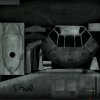
    it's only if i can get in contact with her, she's REALLY busy at present, the high Res texture could take all night to extract because of the way it's compiled but for now i have an old one that could be usable as a guide until then.
    Need help texturing a helicopter-iv_uh60_blackhawk.jpg
    when i get the other one extracted, i'll post it up and if my friend has any ideas she'll tell me to post it up.
    Last edited by Zeealex; 08-13-2011 at 04:32 PM.

  7. #7
    Junior Member
    Join Date
    Aug 2011
    Posts
    8
    Thanks
    0
    Thanked 0 Times in 0 Posts

    Re: Need help texturing a helicopter

    I have tried to do it like in the example, but I have no clue how to get the shown textures from cgtextures.com to a helicopter texture.

    See, I have these aircraft surfaces, that just show a part of an airplane and there is no way to make them fit with the Black Hawk. There are too many bolts, wrong size, wrong shape and wrong text on it. Removing all this plus trying resizing it with Clone Stamp tool... after all, it looks very cheap.

    I can't learn from watching tutorials, because all are just about texturing simple things.
    Example barrier: The tutorial shows a texture that fits perfectly with the square shape of that barrier, does some details and he is done with Photoshop. No extended resizing, or working with harder shapes such as those from helicopters.

    It's exasperating

  8. #8
    Member
    Join Date
    Apr 2012
    Posts
    58
    Thanks
    1
    Thanked 11 Times in 11 Posts

    Re: Need help texturing a helicopter

    You could start by figuring out how to do UV unwrapping. And then once youve learned that you can place textures into the unwrapped UVs.

  9. #9
    Senior Member
    Join Date
    Mar 2012
    Location
    Between the garbage and the concrete, to the construction grounds under our feet..
    Posts
    199
    Thanks
    3
    Thanked 15 Times in 15 Posts

    Re: Need help texturing a helicopter

    I agree with 5600k. You should probably download Blender since it's free, and learn how to UV unwrap. It's pretty simple once the basics are explained. Once you unwrap it, you can open up the document in PS and paint the textures or place textures over the UV map and then import it back into Blender. Here are some basic beginner tutorials on how to unwrap in Blender: http://www.blendtuts.com/2011/01/uvs...es-part-1.html The other two parts are on the same website.

    Also, another tool in Blender is the Texture Painting tool. You can use brushes in the program to paint directly onto the 3D object. http://www.blendtuts.com/texture_painting


  10. #10
    Junior Member
    Join Date
    Aug 2011
    Posts
    8
    Thanks
    0
    Thanked 0 Times in 0 Posts

    Re: Need help texturing a helicopter

    The project is already finished with someone else's help, but I am still curious to learn more in PS...

    You misunderstood: my problem wasn't the unwrapping. That's what the modeler has already done. I have the unwrapped surfaces and blank place to work on in PS.
    It's just that I don't know how to make those "cg-textures" fit with the surfaces I have to paint. At my state of knowledge, I was trying to use a combination of stamp- and healing-tool to copy certain parts, add bolts etc. Turns out that it looks like low-poly, bland, green surface...

    Example:
    Texturing a stone-brick is easy. Get a stone-texture, resize it, done.
    Of course you won't find a whole helicopter-texture that you could do that with: You have to gather certain parts of air-craft metal, bolts, signs, etc. together to basically paint a complete new texture. Thats the part I'm failing at.


Tags for this Thread

Posting Permissions

  • You may not post new threads
  • You may not post replies
  • You may not post attachments
  • You may not edit your posts
Powered by vBulletin® Version 4.1.9
Copyright © 2012 vBulletin Solutions, Inc. All rights reserved.
Content Relevant URLs by vBSEO 3.6.0
Copyright 2011 Photoshop Gurus Forum. All rights reserved.
All times are GMT -5. The time now is 08:57 AM.
vBulletin Skins