+ Reply to Thread
Results 1 to 7 of 7
  1. #1
    Junior Member
    Join Date
    Feb 2010
    Posts
    4
    Thanks
    0
    Thanked 0 Times in 0 Posts

    PLease Guys Help Me

    Hello All
    i know you all are experts
    But if u are gurus for real
    pleaase help me wid this

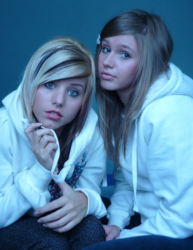
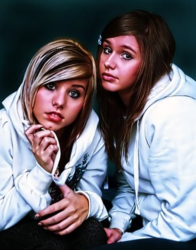
    FROM THIS TO THIS

  2. #2
    Guru
    Join Date
    Jul 2009
    Location
    right in front of you
    Posts
    5,513
    Thanks
    20
    Thanked 123 Times in 120 Posts
    real easy way >image>adjustments>variations >darker I just did this in 1 minute with it....... probably 30 seconds
    Last edited by iDad; 05-05-2011 at 11:33 AM.

  3. #3
    Junior Member
    Join Date
    Feb 2010
    Posts
    4
    Thanks
    0
    Thanked 0 Times in 0 Posts
    Quote Originally Posted by iDad View Post
    real easy way >image>adjustments>variations >darker I just did this in 1 minute with it....... probably 30 seconds

    Brother
    I Think Youre Not Understanding
    I am Giving You a clear Example:
    Look


    FROM THIS TO THIS

  4. #4
    Junior Member
    Join Date
    Feb 2010
    Posts
    4
    Thanks
    0
    Thanked 0 Times in 0 Posts
    Come ON
    No One Here To solve my Problem?

  5. #5
    Junior Member
    Join Date
    Jun 2010
    Posts
    10
    Thanks
    0
    Thanked 0 Times in 0 Posts
    I could be wrong, but it look like it may be a paintover. Basically on a separate layer, one would set the opacity lower and paint over the photo. If this is the technique, there's no way I could replicate it. I got some that matched the color, softness and contrast, but there's some kind of paint effect on it too. That could just be a filter I don't have...

    So... Not really sure. Whoever did it is good. Maybe if you gave us a source, that would help.

    Subscribing. I'd like to know how to do this.
    Last edited by photoshopgeek; 06-11-2010 at 10:50 AM.

  6. #6
    Member
    Join Date
    Jan 2011
    Location
    San Francisco
    Posts
    32
    Thanks
    0
    Thanked 0 Times in 0 Posts

    Re: PLease Guys Help Me

    yeah, I'm on the same page as Ira Garcia. In a little more detail, here's what I think you need to do:

    1. Use a curve tool (on an adjustment layer, not directly) and pull up the highlights and pull down the darks. The curve will look like an 'S' turned 90 degrees right. Play with this a little till you get the contrast right. This will also give you some saturation.
    2. Add saturation (again, adjustment layer not directly) to taste.
    3. Group the Sat and Curve to your base image.
    3. Now to get the glow: Copy these three layers (curve, sat, and original image) to make a second group on top of the first three. in this second group, set the base layer to 'screen'. Now play with the curve in this second group. Bring the darks WAY down. Now add a little blur to the base image of the second group, just a little! Then bring the opacity pretty far down.
    4. Now above everything throw on a little color correction. Everyone does this differently, and you may want to treat different areas of the image differently. But some basic tools to play with: Curve tool's Reg, Green, and Blue layers. Photo filters. Use an image over itself and set it to 'overlay', then vary opacity. I don't know. From here you have to play around to taste.

    Good luck!

  7. #7
    Power User
    Join Date
    Sep 2010
    Posts
    210
    Thanks
    4
    Thanked 9 Times in 8 Posts

    Re: PLease Guys Help Me

    Not sure these are exact but I posted the original next to it and the one I tried to copy form the first post:

    PLease Guys Help Me-nei5cg.png PLease Guys Help Me-nei5cg2.png
    To do this I used Topaz adjust as a photoshop plug in.


Posting Permissions

  • You may not post new threads
  • You may not post replies
  • You may not post attachments
  • You may not edit your posts
Powered by vBulletin® Version 4.1.9
Copyright © 2012 vBulletin Solutions, Inc. All rights reserved.
Content Relevant URLs by vBSEO 3.6.0
Copyright 2011 Photoshop Gurus Forum. All rights reserved.
All times are GMT -5. The time now is 08:56 PM.