
Photoshop Gurus Forum
Welcome to Photoshop Gurus forum. Register a free account today to become a member! It's completely free. Once signed in, you'll enjoy an ad-free experience and be able to participate on this site by adding your own topics and posts, as well as connect with other members through your own private inbox!
You are using an out of date browser. It may not display this or other websites correctly.
You should upgrade or use an alternative browser.
You should upgrade or use an alternative browser.
Graph Paper Erasure
- Thread starter vfx
- Start date
Can you upload an example? It doesn't have to be the whole drawing, as long as it has the blue lines on it, so that I can figure out which technique works best for you.
To upload an image, go to Tinypic.com and upload the image, then copy/paste the complete IMG code provided.
To upload an image, go to Tinypic.com and upload the image, then copy/paste the complete IMG code provided.
Thabks JLBerry,
Back from holidaze.
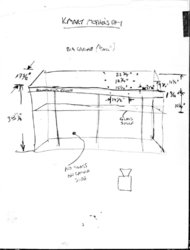
Here is a typical example of the problem. These things can't fax or if the pencil is light or tiny becomes unreadable.
Thank you for your interest.
cheers!

<a href="http://tinypic.com" target="_blank"><img src="http://i48.tinypic.com/34e3gk3.jpg" border="0" alt="Image and video hosting by TinyPic"></a>
http://i48.tinypic.com/34e3gk3.jpg
Back from holidaze.
Here is a typical example of the problem. These things can't fax or if the pencil is light or tiny becomes unreadable.
Thank you for your interest.
cheers!
<a href="http://tinypic.com" target="_blank"><img src="http://i48.tinypic.com/34e3gk3.jpg" border="0" alt="Image and video hosting by TinyPic"></a>
http://i48.tinypic.com/34e3gk3.jpg

KRF
Power User
- Messages
- 413
- Likes
- 5
We seem to have a lot of "iDads" on this forum... sigh
vfx, I'll show you how it's done once I have the time
Yeah but we only have one "JLBerry" that bitches all the time and think's he's the best
As I said earlier I used color deconvolution filter for details of this see..
4N6site.com Forensic Image Processing
You could always try a FFT filter as an example see...
RetouchPRO Tutorials
4N6site.com Forensic Image Processing
You could always try a FFT filter as an example see...
RetouchPRO Tutorials
As I said earlier I used color deconvolution filter
Explain to me why you used words like "color deconvolution filter" that hardly anyone has ever heard of without even providing any link or explanation? Indeed, you needed to fuel your ego.
I also doubt that most people are interested in buying a plug-in each time they have a Photoshop problem...
 (the trial version is rather limited, 8bit, 250px x 250px max).
KRF
Power User
- Messages
- 413
- Likes
- 5
Explain to me why you used words like "color deconvolution filter" that hardly anyone has ever heard of without even providing any link or explanation? Indeed, you needed to fuel your ego.
I also doubt that most people are interested in buying a plug-in each time they have a Photoshop problem...
So then JL what would you say was the best thing to do, please teach us all on how to do it, let the OP finaly listen to a master on how to fix it, I'm sure you can do that can't you? I mean all you have done so fair is bitch about other helping so please show us all how to do it.
KRF
Power User
- Messages
- 413
- Likes
- 5
KRF, were you replying to me? You're slow....hehe... you still don't get it now do you?
No I'm not slow I still knew you would read the messages, that's a human fact, with the mind set you have curiosity always get's in the way.
P.S I know how a forum works, I am a mod of forum's
I still have this pile of graph paper drawings that need the blue taken out of.
I am hoping someone will rise above the fray and give me advice on how to remove the graph from the pencil lines.
Many plug in filters are quick versions of a set of filters and layers combined. Is that the case for Paul MR's "deconvolution filter"? I don't have it and as I said earlier my PCS8.0 is rather old.
Will someone help me?
(thanks Paul!)
I am hoping someone will rise above the fray and give me advice on how to remove the graph from the pencil lines.
Many plug in filters are quick versions of a set of filters and layers combined. Is that the case for Paul MR's "deconvolution filter"? I don't have it and as I said earlier my PCS8.0 is rather old.
Will someone help me?
(thanks Paul!)
Last edited:

I still have this pile of graph paper drawings that need the blue taken out of.
I am hoping someone will rise above the fray and give me advice on how to remove the graph from the pencil lines.
Many plug in filters are quick versions of a set of filters and layers combined. Is that the case for Paul MR's "deconvolution filter"? I don't have it and as I said earlier my PCS8.0 is rather old.
Will someone help me?
(thanks Paul!)
Seriously...how old are you, because you sound like a 5 year bold that needs to be spoon fed any time....sigh
If you're so desperate, then why don't you just follow Paul MR's advice and get the plug-in that DOES seem to do the trick, after all in this case it's actually worth to buy it, since you claim to have this "pile" of work...
Or are you such a Scrooge that you're unwilling to buy a plug-in that can be bought for ANY amount, since it's based on the DONATION principle? Have you actually taken the time to go to that site, try the trial and read what the full version costs or should we have spoon fed that information too Your Highness?
Many plug in filters are quick versions of a set of filters and layers combined. Is that the case for Paul MR's "deconvolution filter
No, that’s not the case with that filter, but seriously... why the heck do you care if it can get rid of your big pile... I don't get people like you, I seriously don't...sigh