
-
Any way to lighten the text to make it a little more readable?
h ttp://tinypic.com/view.php?pic=2j35w6f&s=7
This is my first post so I cant post links but you can check it out from there I hope! Thanks in advanced for any help!
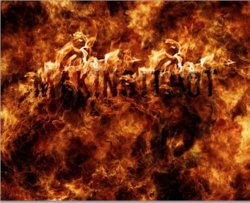
Last edited by iDad; 04-29-2011 at 06:41 PM.
-
-
Administrator
Re: Any way to lighten the text to make it a little more readable?

Originally Posted by
Nelson Walker
This is my first post so I cant post links but you can check it out from there I hope! Thanks in advanced for any help!
You can post images and I'm pretty sure you can post the PSD, that's what I would suggest.
Post the PSD so our members can best tell you how to adjust the text layer.
-
-
Guru
Re: Any way to lighten the text to make it a little more readable?
you could ad a glow effect to the text that may help
-
-
Member
Re: Any way to lighten the text to make it a little more readable?
Duplicate your text layer with another, lighter color and fade it back 'till you are happy .. or add a glow to the existing.
Jim
-
-
Member
Re: Any way to lighten the text to make it a little more readable?
I did not read it all, but there may be more within the tutorial: Photohop Tutorial Link: How to Create an Awesome Burning Text Effect
Jim
-
Posting Permissions
- You may not post new threads
- You may not post replies
- You may not post attachments
- You may not edit your posts
Forum Rules
Powered by
vBulletin® Version 4.1.9
Copyright © 2012 vBulletin Solutions, Inc. All rights reserved.
Content Relevant URLs by
vBSEO 3.6.0
Copyright 2011 Photoshop Gurus Forum. All rights reserved.