+ Reply to Thread
Page 2 of 2 FirstFirst 12
Results 11 to 20 of 20
  1. #11
    Forum Mod
    Join Date
    Jun 2011
    Location
    Imperial Beach, CA, US
    Posts
    3,573
    Thanks
    97
    Thanked 218 Times in 217 Posts

    Re: How to make handdrawn script (font) look like it was done on the computer

    Quote Originally Posted by yeaokwali View Post
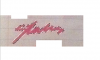
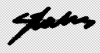
    Went all the way through the tutorial came out pretty messy Attachment 7166 If I could clean this up I might be on to something
    The tutorial was designed for black on white images; is that what you used?
    Like Stric9 says, you could use the tools for writing directly in Photoshop. Personally, I never get good results.

  2. #12
    Junior Member
    Join Date
    Aug 2011
    Posts
    24
    Thanks
    4
    Thanked 0 Times in 0 Posts

    Re: How to make handdrawn script (font) look like it was done on the computer

    Quote Originally Posted by Stric9 View Post
    Why don't you write this with the pen tool then stroke it with a brush?
    Just how easy is this to do?

  3. #13
    Junior Member
    Join Date
    Aug 2011
    Posts
    24
    Thanks
    4
    Thanked 0 Times in 0 Posts

    Re: How to make handdrawn script (font) look like it was done on the computer

    Quote Originally Posted by ibclare View Post
    The tutorial was designed for black on white images; is that what you used?
    Like Stric9 says, you could use the tools for writing directly in Photoshop. Personally, I never get good results.
    I can imagine lol

  4. #14
    Power User
    Join Date
    Sep 2010
    Location
    Southern, Illinois
    Posts
    391
    Thanks
    11
    Thanked 38 Times in 37 Posts

    Re: How to make handdrawn script (font) look like it was done on the computer

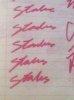
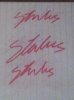
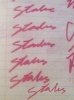
    Just write it out and stroke it....takes a min or two....used the bottom one to trace.
    How to make handdrawn script (font) look like it was done on the computer-img_0139-copy.jpg

  5. The Following User Says Thank You to Stric9 For This Useful Post:

    yeaokwali (08-21-2011)

  6. #15
    Junior Member
    Join Date
    Aug 2011
    Posts
    24
    Thanks
    4
    Thanked 0 Times in 0 Posts

    Re: How to make handdrawn script (font) look like it was done on the computer

    Quote Originally Posted by Stric9 View Post
    Just write it out and stroke it....takes a min or two....used the bottom one to trace.
    Attachment 7173
    How did you do that? And I want to use the second one from the bottom.

  7. #16
    Power User
    Join Date
    Sep 2010
    Location
    Southern, Illinois
    Posts
    391
    Thanks
    11
    Thanked 38 Times in 37 Posts

    Re: How to make handdrawn script (font) look like it was done on the computer

    this should give you some guidence http://http://www.photoshopessential...with-brush.php

  8. #17
    Junior Member
    Join Date
    Aug 2011
    Posts
    24
    Thanks
    4
    Thanked 0 Times in 0 Posts

    Re: How to make handdrawn script (font) look like it was done on the computer

    Quote Originally Posted by Stric9 View Post
    EDIT: I'm following this tutorial exactly I type my text and I leave the type tool still selected except when I right click inside the document the option paragraph text size comes up instead of the sub menu of options I'm supposed to be getting for the text. What am I doing wrong?
    Last edited by yeaokwali; 08-21-2011 at 11:05 PM.

  9. #18
    Power User
    Join Date
    Sep 2010
    Location
    Southern, Illinois
    Posts
    391
    Thanks
    11
    Thanked 38 Times in 37 Posts

    Re: How to make handdrawn script (font) look like it was done on the computer

    sorry that link is for a diff tut.....I just searched google and thats what came up....I glanced over it and thought it would help.

    This should be better

  10. #19
    Junior Member
    Join Date
    Aug 2011
    Posts
    24
    Thanks
    4
    Thanked 0 Times in 0 Posts

    Re: How to make handdrawn script (font) look like it was done on the computer

    Quote Originally Posted by Stric9 View Post
    sorry that link is for a diff tut.....I just searched google and thats what came up....I glanced over it and thought it would help.

    This should be better
    I figured out the older tutorial which I'm assuming is all I need to create the path/brush stroke like you did? Still I'll take a look at this vid.

  11. #20
    Junior Member
    Join Date
    Aug 2011
    Posts
    24
    Thanks
    4
    Thanked 0 Times in 0 Posts

    Re: How to make handdrawn script (font) look like it was done on the computer

    I followed the tutorial to success and its giving me exactly what it promised an outline. Which isn't really a trace per say at least not like the one you did. I'm assuming you used the pen tool? Which wasn't mentioned in the initial link but the guy did use it in the video. Is there anyway you can upload a video? Capture yourself tracing the script? Or give some instructions detailing what you did?


Tags for this Thread

Posting Permissions

  • You may not post new threads
  • You may not post replies
  • You may not post attachments
  • You may not edit your posts
Powered by vBulletin® Version 4.1.9
Copyright © 2012 vBulletin Solutions, Inc. All rights reserved.
Content Relevant URLs by vBSEO 3.6.0
Copyright 2011 Photoshop Gurus Forum. All rights reserved.
All times are GMT -5. The time now is 01:17 PM.
vBulletin Skins