
Hi guys
Hope you can help
I’m trying to remove a white back ground from a stock image - and make it transparent , but don’t know how to - let me explain .
I have a fish bowl that currently has a white back ground - this bowl will be placed on a surface and have the white be transparent so the bowl is in essence see through - I’ve tried everything I can think of - but am kind of getting it right , but the bowl ends up looking either vector or the edges of the glass end up looking black - can anyone help?
thanks in advance
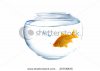 Ie if i put this on a counter - how do i put the back ground in the bowl as if its see through
  any tutorial would be great or if anyone can point me in the right direction.
thanks guys
zoelfica
Hope you can help
I’m trying to remove a white back ground from a stock image - and make it transparent , but don’t know how to - let me explain .
I have a fish bowl that currently has a white back ground - this bowl will be placed on a surface and have the white be transparent so the bowl is in essence see through - I’ve tried everything I can think of - but am kind of getting it right , but the bowl ends up looking either vector or the edges of the glass end up looking black - can anyone help?
thanks in advance
Ie if i put this on a counter - how do i put the back ground in the bowl as if its see through any tutorial would be great or if anyone can point me in the right direction.thanks guys
zoelfica


