
+ Reply to Thread
Results 1 to 3 of 3
  1. #1
    Newbie
    Join Date
    Sep 2011
    Posts
    1
    Thanks
    0
    Thanked 0 Times in 0 Posts

    How do i achieve this brush effect?

    Hi

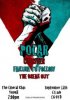
    I've come across a few designs like this and i'd love to know how to do this brush effect. I can't seem to figure it out and i don't know what to search on google to find out!
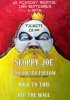
    How do i achieve this brush effect?-poster.jpg

    How do i achieve this brush effect?-poster-2.jpg

    Sorry about the image size! And im talking about the brush effect where it sort of darkens at points and fades a bit, rather than just being a solid colour.

    Any help would be appreciated!

    Thanks,
    James

  2. #2
    Member
    Join Date
    Sep 2011
    Posts
    86
    Thanks
    9
    Thanked 1 Time in 1 Post

    Re: How do i achieve this brush effect?

    im not sure but i think its some where in the filters under artistic try some of them out and see what you get out of it

  3. #3
    Power User
    Join Date
    Sep 2010
    Location
    Southern, Illinois
    Posts
    391
    Thanks
    11
    Thanked 38 Times in 37 Posts

    Re: How do i achieve this brush effect?

    I would use some grunge texture like a concrete floor or something desaturate it and use blending mode overlay. You might apply an artistic filter to the overlay also. I think that would accomplish the look you are going for.
    Last edited by Stric9; 09-10-2011 at 07:50 PM.


Tags for this Thread

Posting Permissions

  • You may not post new threads
  • You may not post replies
  • You may not post attachments
  • You may not edit your posts
Powered by vBulletin® Version 4.1.9
Copyright © 2012 vBulletin Solutions, Inc. All rights reserved.
Content Relevant URLs by vBSEO 3.6.0
Copyright 2011 Photoshop Gurus Forum. All rights reserved.
All times are GMT -5. The time now is 01:18 PM.
vBulletin Skins