-
Power User
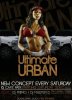
How can i get my letters army colors like this one?

Just like in Ultimate Urban?
Btw: if i have some nice texture and i put letter on it.. how can get that my the texture is in my letters without the background?
-
-
Guru
Re: How can i get my letters army colors like this one?
Hi Windows7
Welcome back.
Well, if your text is on it's own layer whit a solid black or white background, just place your texture above it and change the blend to overlay or multiply, it should do it.
If not working whit solid backgrounds, just place your texture above, as mentioned before and create a clipping mask based on your text layer, to be able to see the texture thru your text.
This may help, Photo In Text
Cuando soy Bueno, soy muy BUENO
Pero cuando soy malo, soy mucho MEJOR
-
-
Re: How can i get my letters army colors like this one?
You can do it the easy way, create a text layer , and above it create a layer with an image. Select the image layer and joust click CTRL + ALT + G and you're image should be in the text.
-
-
Guru
Re: How can i get my letters army colors like this one?
Hi lukavidovic
That will be the same thing mentioned above, what you are referring to, will be the keyboard short cut for creating that clipping mask.
Cuando soy Bueno, soy muy BUENO
Pero cuando soy malo, soy mucho MEJOR
-
-
Power User
Re: How can i get my letters army colors like this one?
Thank you very much both! 
The most simple and easiest answer is/was: just "ctrl+alt+g"..
-
Tags for this Thread
Posting Permissions
- You may not post new threads
- You may not post replies
- You may not post attachments
- You may not edit your posts
Forum Rules
Powered by
vBulletin® Version 4.1.9
Copyright © 2012 vBulletin Solutions, Inc. All rights reserved.
Content Relevant URLs by
vBSEO 3.6.0
Copyright 2011 Photoshop Gurus Forum. All rights reserved.