Hi everyone,
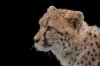
I'm trying to create a really good selection of the cheetah in the photo below. I've tried the refine edge tool in cs5 and am having a couple of problems. When I use the refine edge and radius tool, it seems like I pick up more detail than my starting selection, but when I hit ok and go back to the original image, the selection it shows reverts back to what I originally had. None of the additional detail found by the tool shows up. ????
Second, as you can see, there are some detailed strands of fur at the edge which are black and a different color from most of the rest of the selection. I can't get refine edge to pick these up. Is this just impossible or is there something I can do??
Any advice would be very welcome. Am I doing something wrong with refine edge?I'm also up for alternative methods, basically anything that might do a better than what I get now. Thanks so much.
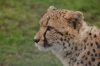
I'm trying to create a really good selection of the cheetah in the photo below. I've tried the refine edge tool in cs5 and am having a couple of problems. When I use the refine edge and radius tool, it seems like I pick up more detail than my starting selection, but when I hit ok and go back to the original image, the selection it shows reverts back to what I originally had. None of the additional detail found by the tool shows up. ????
Second, as you can see, there are some detailed strands of fur at the edge which are black and a different color from most of the rest of the selection. I can't get refine edge to pick these up. Is this just impossible or is there something I can do??
Any advice would be very welcome. Am I doing something wrong with refine edge?I'm also up for alternative methods, basically anything that might do a better than what I get now. Thanks so much.