
qmcquackers
New Member
- Messages
- 2
- Likes
- 0
Hello all!
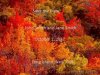
Got a question that I was hoping one of you PS gurus could help out with. My fiancee and I are recently engaged, and in an effort to save some cash, and produce a product that is our own, we are making our own Save the Date. Attached is an example I made, not the actual photo and text we are using.
We are attempting to place text over an image that has some significant color contrast. As you can see on the example, certain areas work well with the color of the text, and others not so much. We were wondering if there is some text effects that could be added to better enhance the text, while keeping a organic feel to it. We want the words to pop, but not add a 3D text effect or some such, which would look silly for the image and idea we're going for.
This might be a tough one, as the color of the text will remain the same, over a background that involves multiple different fall colors. We were wondering if there are some PS tricks that may allow pop, without making it gimicky and silly. Our idea is organic, earthy and basic. Thoughts? Thanks in advance!
Got a question that I was hoping one of you PS gurus could help out with. My fiancee and I are recently engaged, and in an effort to save some cash, and produce a product that is our own, we are making our own Save the Date. Attached is an example I made, not the actual photo and text we are using.
We are attempting to place text over an image that has some significant color contrast. As you can see on the example, certain areas work well with the color of the text, and others not so much. We were wondering if there is some text effects that could be added to better enhance the text, while keeping a organic feel to it. We want the words to pop, but not add a 3D text effect or some such, which would look silly for the image and idea we're going for.
This might be a tough one, as the color of the text will remain the same, over a background that involves multiple different fall colors. We were wondering if there are some PS tricks that may allow pop, without making it gimicky and silly. Our idea is organic, earthy and basic. Thoughts? Thanks in advance!

