+ Reply to Thread
Results 1 to 5 of 5
  1. #1
    Newbie
    Join Date
    Dec 2011
    Posts
    3
    Thanks
    0
    Thanked 0 Times in 0 Posts

    How do I get this colouring effect?

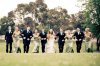
    My photographer took this photo of me and I absolutely LOVE the colouring. Can anyone tell me how to replicate it in Photoshop? I'm almost certain she would have done this in Lightroom.

    How do I get this colouring effect?-387746_510931928349_218800254_269558_1501099743_n.jpg

  2. #2
    Member
    Join Date
    Dec 2011
    Location
    Cambridge UK
    Posts
    30
    Thanks
    0
    Thanked 5 Times in 5 Posts

    Re: How do I get this colouring effect?

    Hello Lastsong..

    You can get this effect fairly easily in Photoshop by adjusting first of all the image exposure, and then adding some blur to the background.

    Choose an image that you feel suitable for the effect and add an Adjustment Layer ( The round, half black/half white icon in the layers palette ). Choose Exposure from the adjustment menu. Using the sliders make your adjustment.

    Click back to the main image layer. Add a layer mask to this layer.

    Now make a selection of your main subject. Hit Shift + Ctrl + I on the keyboard to invert the selection. This will select the background.

    Now go Filter > Blur > Gaussian blur and adjust to suit.

    Because you have a layer mask on this layer you can now use a soft black brush to undo/paint out any of the gaussian effect that you don't want. Lower the opacity of your brush to just lesson the effect.

    Note: When using a layer mask in this way, a black brush will paint out your adjustment. If a mistake is made...Oops. Change to a white brush to paint out the mistake.

  3. #3
    Newbie
    Join Date
    Dec 2011
    Posts
    3
    Thanks
    0
    Thanked 0 Times in 0 Posts

    Re: How do I get this colouring effect?

    Thanks for that Frank, however the blurring behind is actually the camera lens's doing - photo was taken with a 50mm lens which has blurred the background because it was taken close. And adding an exposure layer doesn't actually give the colouring - the photo kind of reminds me of a blue exclusion layer, but it looks warmer than that.

    And sorry, I'm not actually a newbie to Photoshop, just didn't know where I was supposed to put this.

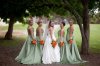
    This uses the same colouring:
    How do I get this colouring effect?-392050_10150399484526848_81805236847_8752034_2551989_n.jpg

    And this is a photo with the natural colours so that you can see how much the colours have been changed:
    How do I get this colouring effect?-382756_10150399484661848_81805236847_8752035_816413506_n.jpg

  4. #4
    Member
    Join Date
    Dec 2011
    Location
    Cambridge UK
    Posts
    30
    Thanks
    0
    Thanked 5 Times in 5 Posts

    Re: How do I get this colouring effect?

    No problem at all Lastsong, but without having the benefit of seeing both the before and after images I have no way of knowing what has been changed or to what degree. On my monitor the image in your first post does look a little over exposed. Images will always look different on different monitors. And yes, the depth of field on a decent camera can be set to give this effect. But please forgive me for saying, but you asked how to replicate the image in Photoshop.

    As for the two lovely images in your second post...once again it would be easier if we could see the before and afters. Although having said that, regarding the top image in your second post. I think that a similar effect could be had by using a levels adjustment layer.

    Thankyou for showing us your pics, they're really nice.

  5. #5
    Newbie
    Join Date
    Dec 2011
    Posts
    3
    Thanks
    0
    Thanked 0 Times in 0 Posts

    Re: How do I get this colouring effect?

    Quote Originally Posted by PseFrank View Post
    But please forgive me for saying, but you asked how to replicate the image in Photoshop.
    No, I asked how to replicate the colouring in Photoshop and the thread title is "how do I get this colouring effect". ;)

    The reason I gave the second two photos is to show you what has been changed. The second photo has had very light editing - the colours have been balanced and that is it, they are completely true to life. The first photo had the exact same colour balancing done, and then has had the colouring that I want to replicate applied. Unfortunately I do not have original RAW files of any of the photos - photographers are very loathe to give these out, which is completely understandable. And I haven't been able to get a similar effect with levels adjustment.

    Thanks for your help anyway, will ask on a Photography forum. I just thought Photoshop users may have a better idea because many photography people only use Lightroom.


Tags for this Thread

Posting Permissions

  • You may not post new threads
  • You may not post replies
  • You may not post attachments
  • You may not edit your posts
Powered by vBulletin® Version 4.1.9
Copyright © 2012 vBulletin Solutions, Inc. All rights reserved.
Content Relevant URLs by vBSEO 3.6.0
Copyright 2011 Photoshop Gurus Forum. All rights reserved.
All times are GMT -5. The time now is 01:40 PM.
vBulletin Skins