+ Reply to Thread
Results 1 to 6 of 6
Like Tree1Likes
  • 1 Post By webwize

Thread: Easiest way to CREATE gradient banding?

  1. #1
    Newbie
    Join Date
    Dec 2011
    Posts
    3
    Thanks
    0
    Thanked 0 Times in 0 Posts

    Easiest way to CREATE gradient banding?

    I've searched high and low for an easy way to do this, but of course it turns out most people want to remove gradient banding

    I know usually people need to get rid of gradient banding, but I actually need to create it.

    So, what is the easiest way to create gradient banding?

    I know that you can do this in the gradient editor itself, by layering multiple color points on top of each other, but the tools are extremely flakey and it can be difficult/frustrating to do it this way. Especially if you already have a smooth gradient and want to introduce banding to it. What I want to know is; does anyone have any tips for using the editor to introduce banding to an already smooth gradient, within the gradient editor itself?

    And failing that, is there a filter or some other method for introducing banding to a gradient that has already been applied to the image?

  2. #2
    Member
    Join Date
    Dec 2011
    Location
    Milwaukee, Wi.
    Posts
    50
    Thanks
    1
    Thanked 3 Times in 3 Posts

    Re: Easiest way to CREATE gradient banding?

    Try Filter/Artistic/Poster Edges, or Cut out.
    The edges can look a little sloppy and pixelated, but i guess that depends on the resolution of your image
    Attached Thumbnails Attached Thumbnails Easiest way to CREATE gradient banding?-untitled-1.jpg  


  3. #3
    Newbie
    Join Date
    Dec 2011
    Posts
    3
    Thanks
    0
    Thanked 0 Times in 0 Posts

    Re: Easiest way to CREATE gradient banding?

    Awesome, thanks! Giving this a try. Seems to be tough to get the banding to be nice and clean, without an weird artifacting. Probably just need to mess with the filter settings some more. Thanks for the suggestion!

  4. #4
    Member
    Join Date
    Oct 2011
    Location
    Swansea, Wales
    Posts
    92
    Thanks
    4
    Thanked 9 Times in 9 Posts

    Re: Easiest way to CREATE gradient banding?

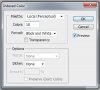
    You could also use the Indexed Colour mode:

    Image/Mode/Indexed Colour

    If you do this you can set the numbers of "bands you are looking for and it should be very smooth.

    Easiest way to CREATE gradient banding?-bandedgradient.jpg

    This was created with these settings:

    Easiest way to CREATE gradient banding?-indexmode.jpg

    This does however have the drawback of affecting your whole image so best to create in another file and paste the results into whatever you are working on.

    webwize
    Paul likes this.

  5. #5
    Silly Trucker
    Join Date
    May 2011
    Location
    Trucking the big roads, dust and all.
    Posts
    4,564
    Thanks
    44
    Thanked 228 Times in 223 Posts

    Re: Easiest way to CREATE gradient banding?

    Very nice mate, good little tut also.


  6. #6
    Newbie
    Join Date
    Dec 2011
    Posts
    3
    Thanks
    0
    Thanked 0 Times in 0 Posts

    Re: Easiest way to CREATE gradient banding?

    Excellent technique. Thankyou!


Tags for this Thread

Posting Permissions

  • You may not post new threads
  • You may not post replies
  • You may not post attachments
  • You may not edit your posts
Powered by vBulletin® Version 4.1.9
Copyright © 2012 vBulletin Solutions, Inc. All rights reserved.
Content Relevant URLs by vBSEO 3.6.0
Copyright 2011 Photoshop Gurus Forum. All rights reserved.
All times are GMT -5. The time now is 01:45 PM.
vBulletin Skins