2Likes
-
1
Post By Hoogle
-
1
Post By sprucemagoo1
-
Member
-
-
Forum Mod
Re: How to make such effects?
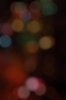
|The first image is Bokah made with camera by having lights in the background but with a low aperature so your camera can not focus them properly. You can easily create bokeh in photoshop using Bokeh brushes actions and even Alien skin do a plug in called Bokeh available here for a 30 day demo trial Alien Skin Software: Bokeh 2.
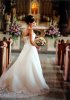
The 2nd image is camera based as well low aperature so throws everything out of focus except for what you have focused in. the link i provided also does this effect and so does many other companies like nik software and topaz labs they are called lens effects.
without 3rd party plugins though you can achieve it by duplicating your image then go to filter > blur > Gaussian blur and blur it to however you like.
Apply a layer mask and use a soft edge brush and paint in black where you would like your image to be in focus.
Just try not to have a hard brush so you can see it is photoshopped and un natural.
-
-
Member
Re: How to make such effects?
i only have standard camera nikon d5000 with 18-55 lens only... i dont think i can have that effect with my current lens... so about the bokah thing... if there is a person in front of it and the lights like that at the back will it also possible using bokeh? what about the brushes? can i download or just use bokeh instead.. will give it a download trial later..
about the wedding is it possible to do with my current lens? anyway thanks for the responses...
-
-
Forum Mod
Re: How to make such effects?
I also have a nikon d5000 lso I have a kit lens You can get this effect if you stand far enough back but honestly it will not be any where near as good as the 18-55 is not a telephoto lens really you are looking more at 200mm lenses. Tamron do a nice 70-200 mm telephoto lense for around $150 and the quality is amazing I have the Nikor version and tamron and the tamron is just as good and in some areas quicker considering the $200 price difference.
you can get the Bokah effect on that lense though but you have to have the camera close to the subject you want to focus on and the lights about 5 - 10 meters in the background easily done with christmas lights.
Just put your camera in aperature priority and not any of the auto settings. you will need it about f4.8 which is the lowest the 18 - 55 mm lens does I think also if you slow the shutter speed down the bokah will have more of a star effect.
all though things can be created in photoshop I prefer to just enhance it and have a good ground photo to work from if you get what you want in your photo straight from camera you will get better results.
Do not under estimate the d5000 it is practically the same as the d90 and once you have learnt the manual settings shutter priority or aperature mode it is still a very powerfull camera especially if you get a mid range lens.
-
-
Member
Re: How to make such effects?
wow... thanks for the suggestions.. yea i tried and its quite hard to focus on the subject while also focusing on the lights with this lens...
btw i try to take photo of christmas lights and make effects using bokah.. here is the result tho.. just playin around... it really looks real
any tips on bokah?
-
-
Forum Mod
Re: How to make such effects?
The trick is not to get focus on the lights but good job next step is painting with light
check this out.
-
The Following User Says Thank You to Hoogle For This Useful Post:
-
Member
-
-
Forum Mod
Re: How to make such effects?
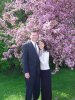
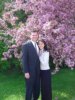
you need like for like to try and compare your image they are standing to close to the cherry blossom so blurring it would look un natural and above there heads it is in focus and then suddenly blurred.
also the lighting is opposite ends of the spectrum the wedding pic is dark and rich in tone from being shot in a darker enviroment where as your google image is bright and sunny.
As for camera settings on D5000 or any camera you want to put the shutter release to bulb mode and get a shutter cable release so you can manually control the shutter time press it to open the shutter then press it again to close the shutter your best of doing large light painting pictures with at least 2 people 1 to control the camra and 1 or more to paint in the light.
You could use a tripod and do it yourself but placing the shutter release cable down or pressing the normal shoot button will cause camera shake and can cause your image to be blured.
Not such a bad thing when it comes to light painting unless you want to actually trace an object with light as if that gets blurred it will ruin the photo.
-
-
Member
Re: How to make such effects?

Originally Posted by
Hoogle
you need like for like to try and compare your image they are standing to close to the cherry blossom so blurring it would look un natural and above there heads it is in focus and then suddenly blurred.
also the lighting is opposite ends of the spectrum the wedding pic is dark and rich in tone from being shot in a darker enviroment where as your google image is bright and sunny.
okay i think i get what u mean... btw how to make such dark effect? it looks so soft dark.. is it also possible to do it using photoshop? i want to try if i can make that picture blossom dark like that as a practice... anyway thanks for ur help Hoogle.. i really appreciate your guides...every single thing
-
-
Guru
Re: How to make such effects?
If this is similar, the .psd will explain it.
6djlx3cs.psd
-
The Following User Says Thank You to sprucemagoo1 For This Useful Post:
Tags for this Thread
Posting Permissions
- You may not post new threads
- You may not post replies
- You may not post attachments
- You may not edit your posts
Forum Rules
Powered by
vBulletin® Version 4.1.9
Copyright © 2012 vBulletin Solutions, Inc. All rights reserved.
Content Relevant URLs by
vBSEO 3.6.0
Copyright 2011 Photoshop Gurus Forum. All rights reserved.