
+ Reply to Thread
Page 1 of 2 12 LastLast
Results 1 to 10 of 12
Like Tree1Likes

Thread: Refine mask problem

  1. #1
    Junior Member
    Join Date
    Jan 2012
    Posts
    22
    Thanks
    1
    Thanked 0 Times in 0 Posts

    Refine mask problem

    Hi there

    I am new to this group and have been using Photoshop many years. The Refine Mask tool is really a great tool if used tactfully. It looks awesome in tutorials also specially if your instructor is someone like Deke. However, I am experiencing some problems to get the desired results even though the object in my example is less complicated than stray hair which is normally shown in tutorials.

    Do you guys have any clues as to what could be the reason. Note that in all the 3 examples, I have used "Smart Radius" with varying pixel settings. Smooth option was used only in "Try 1 & 2".

    Do you feel it cannot be further improved from what you see in Try 3? Obviously not, that's what I would like to hear from you guys.

    I would really appreciate your quick feedback!

    Thanks
    Syed
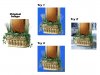
    Refine mask problem-refine_mask.jpg

  2. #2
    Member
    Join Date
    Dec 2011
    Posts
    72
    Thanks
    1
    Thanked 6 Times in 6 Posts

    Re: Refine mask problem

    Yes, it can be improved:
    Attached Thumbnails Attached Thumbnails Refine mask problem-extract.jpg  


  3. #3
    Silly Trucker
    Join Date
    May 2011
    Location
    Trucking the big roads, dust and all.
    Posts
    4,564
    Thanks
    44
    Thanked 228 Times in 223 Posts

    Re: Refine mask problem

    Why is the angle on yours so different to original posters?
    iDad likes this.

  4. #4
    Member
    Join Date
    Dec 2011
    Posts
    72
    Thanks
    1
    Thanked 6 Times in 6 Posts

    Re: Refine mask problem

    I grabbed a different image that was larger to prove a point and I was hoping that he would figure it out first, but I don't mind that you did instead.

    You have a keen eye Paul!

    Mind you, it's not the complete solution to grab an image that is larger, I used a CMYK image and copied the yellow channel, touched that up with levels, the burn tool and a black brush, used some better settings in refine mask (like 100% decontaminate colors) and worked with a 3 extra clipping masks and the smudge tool and a green brush to improve a few edges.

    To show that the techniques also make a difference on the image labeled "Original Image", I applied the same techniques to that one too (see screenshot).
    But in all fairness....extracting an image that's 200x200 pixels like this one and which also suffers from jpeg artifacts, is always going to be a major challenge.

    But luckily enough, most personal digital photos or third party stock images will have enough resolution to make a clean extraction.

    Someone will have the most problems when he grabs small low quality images from the internet, but then again....most of these images have copyright and we're not even allowed to use them in the first place.
    Attached Thumbnails Attached Thumbnails Refine mask problem-palette1.jpg  

    Refine mask problem-200pixels.jpg  

    Last edited by Furio; 01-06-2012 at 10:19 PM. Reason: Additional info and image added

  5. #5
    Silly Trucker
    Join Date
    May 2011
    Location
    Trucking the big roads, dust and all.
    Posts
    4,564
    Thanks
    44
    Thanked 228 Times in 223 Posts

    Re: Refine mask problem

    Grabbed it from where? I can't find it anywhere?

  6. #6
    Member
    Join Date
    Dec 2011
    Posts
    72
    Thanks
    1
    Thanked 6 Times in 6 Posts

    Re: Refine mask problem

    I got it from Google images.

  7. #7
    Silly Trucker
    Join Date
    May 2011
    Location
    Trucking the big roads, dust and all.
    Posts
    4,564
    Thanks
    44
    Thanked 228 Times in 223 Posts

    Re: Refine mask problem

    How did you know what its called, i did a tiny eye on the image and that turned no results other than here?

  8. #8
    Senior Member
    Join Date
    Mar 2011
    Location
    Belgium
    Posts
    123
    Thanks
    1
    Thanked 21 Times in 20 Posts

    Re: Refine mask problem


  9. #9
    Junior Member
    Join Date
    Jan 2012
    Posts
    22
    Thanks
    1
    Thanked 0 Times in 0 Posts

    Re: Refine mask problem

    Hello everyone, thanks for your messages.

    Furio, thanks for your feedback. Of course, I could have spotted this out, had I seen it before Paul. The change is quite obvious and even amateurs like me can notice it.

    I will try to follow the steps mentioned by Furio to see if I could get any closer to what he has achieved with the same image.

    Good thing is that you guys turned up to my request and have given valuable suggestions.

    Keep in touch

    Syed

  10. #10
    Member
    Join Date
    Dec 2011
    Posts
    72
    Thanks
    1
    Thanked 6 Times in 6 Posts

    Re: Refine mask problem

    Quote Originally Posted by Paul View Post
    How did you know what its called, i did a tiny eye on the image and that turned no results other than here?
    Paul, TinyEye is outdated, it hardly finds anything and a lot of links are dead. Use Google Images instead and click on the little camera icon inside its search box and you'll thank me forever.

    More here: Search by Image · Inside Google Search


Tags for this Thread

Posting Permissions

  • You may not post new threads
  • You may not post replies
  • You may not post attachments
  • You may not edit your posts
Powered by vBulletin® Version 4.1.9
Copyright © 2012 vBulletin Solutions, Inc. All rights reserved.
Content Relevant URLs by vBSEO 3.6.0
Copyright 2011 Photoshop Gurus Forum. All rights reserved.
All times are GMT -5. The time now is 02:01 PM.
vBulletin Skins