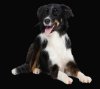
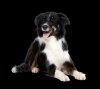
New member needs a bit of help with cutting out furry animal.
Hello!
I'm new to this forum and just found it while searching for way to complete a project I'm working on. I'm trying to make a cut out of a dog but I have some problems with a white halo on the bottom of the image (it's visible on the attached images). I'd also like to ask for some advice on how I should go about touching up the edges of the dog so it would look ok on a dark background. The image probably won't be used on a dark background but I really want to learn how to do this type of thing. I'd like to apologize in advance if parts of my post don't make sense since English isn't my native language. Any help on the matter is greatly appreciated.
Re: New member needs a bit of help with cutting out furry animal.
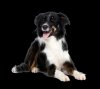
Unfortunately that article covers nothing that I haven't tried out before. I really dislike the result of using a high value on color decontamination. Any other ideas perhaps?
Re: New member needs a bit of help with cutting out furry animal.
Try adding a mask and with various brushes bring the edge detail back in. With a background of black, this should get rid of the white halo obviously depending on what brush or brushes you choose to run around the edge.
Re: New member needs a bit of help with cutting out furry animal.
You've actually done a pretty good job. Extractions are difficult. Did you use channels to get to this point? Channels are pretty quick and involve the layer masking Remote-medic brought up. The good thing about using a mask to make additions and subtractions is you don't erase any pixels, so you can go back and forth between the add and subtract (non-destructive) as much as you want.
A couple suggestions. Get some brushes that have the furry edges (animal fur brushes are probably out there, check on deviantart.com). My reasoning for this is that you can come into the fur from outside the image and sort of trim into the edges with a similar edge where a round soft brush might be harder to get the contour you want. And involve more painting. Or you have the option to get rid of the wite edges, then put the animal fur back onto the edge. The second suggestion is that you experiment setting the brush blend mode on overlay, soft light, etc., and see what happens.
Re: New member needs a bit of help with cutting out furry animal.
Thanks for all the advice.I'm going to give it a go today and I'll let you know how it ends up. I tried doing this with channels as well but I got the best result with color range and the refine edge command. I just hate it when advanced and complicated techniques don't beat the simple and easy ones Anyway thanks again!
Re: New member needs a bit of help with cutting out furry animal.
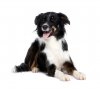
For comparison, here's what you can get with a couple of minutes using a dedicated masking program called Topaz Re-Mask. It's certainly an improvement on what "refine edges" can give you, but note that it completely gave up on trying to figure out the area between the dog's front paws.
This program has a feature similar to the "F" key in "refine edges" in that it allows the user to cycle between different views, eg, black bkgnd, white bkgnd, original, mask, etc. You definitely need to use that to get the most out of the pgm, but doing so and then adjusting for what you see in each of the views slows you down a bit. Because of this, whether or not its faster or better than more manual methods is up for debate. It certainly gets one close quickly and doesn't chew into the subject (making the dog look thinner) as much as some of the make-the-edges-rough methods have a tendency to do. In the negative column, it can leave some unnaturally sharp edges (eg along the (viewer's) right side of the dog) that would have to be dealt with.