
+ Reply to Thread
Results 1 to 9 of 9
Like Tree2Likes
  • 1 Post By chitkaran
  • 1 Post By MikeMc

Thread: Did some practice on selection tools

  1. #1
    Member
    Join Date
    Dec 2012
    Location
    Vienna, Austria
    Posts
    52
    Thanks
    3
    Thanked 3 Times in 3 Posts

    Did some practice on selection tools

    what do you think? does this blend halfway decent?
    It'd be great if you'd point out what looks unnatural to you so i can work on it
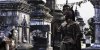
    Did some practice on selection tools-test.jpg


    ps: I know, the motive does not make much sense, but i just used it as practice and did not want to look for better stock ;)

  2. #2
    Member
    Join Date
    Dec 2012
    Location
    Vienna, Austria
    Posts
    52
    Thanks
    3
    Thanked 3 Times in 3 Posts

    Re: Did some practice on selection tools

    btw, what is the "proper" way to handle something like this?

    what i am doing now, is using quick select, refining the edges, creating a layer mask from that, and finepaint details on that mask.
    afterwards, i create some adjustment layers and duplicate the mask there, if i want them only to affect those. and then i link them together and put them in a group.

    only problem, when i find a mistake later, i have to reapply the masks on all adjustment layers by hand..

  3. #3
    Power User
    Join Date
    Mar 2011
    Location
    Belgium
    Posts
    252
    Thanks
    7
    Thanked 54 Times in 52 Posts

    Re: Did some practice on selection tools

    good job :-)

    for the adjustment layers you can make a clipping mask
    You can do this by hovering the mouse on the line between the two layers, hold down Alt or Option, and when you see the cursor change to a double circle with a tiny, left-pointing arrow, click.

    than the adjustment works only on that layer

    http://graphicdesign.stackexchange.c...roup-of-layers

  4. The Following User Says Thank You to colleague For This Useful Post:

    valravn (12-08-2012)

  5. #4
    Member
    Join Date
    Dec 2012
    Location
    Vienna, Austria
    Posts
    52
    Thanks
    3
    Thanked 3 Times in 3 Posts

    Re: Did some practice on selection tools

    exactly what i needed. i was shure something as sophisticated as light room had this, but no idea where xD
    many thanks

    ps: those are five different object, in case you wanted to know

  6. #5
    Guru
    Join Date
    Sep 2012
    Location
    Texas
    Posts
    947
    Thanks
    13
    Thanked 91 Times in 87 Posts

    Re: Did some practice on selection tools

    Hey valravn,

    Quote Originally Posted by valravn
    only problem, when i find a mistake later, i have to reapply the masks on all adjustment layers by hand..
    Prior to and/or after making changes to a layer I always duplicate the layer, turn it off, and move to the bottom. I will also do this before I merge layers as well. I also use smart layers and smart masks so I can make changes to them later.

    As for the image, for me, the background and foreground appear flat or without dimension. Follow vanishing point rules and remember that objects in the back ground get slightly blurry the further they are from the foreground. The third structure back is way too dark, it lighting doesn't match the other structures.

    HTH

  7. #6
    Queen Bee
    Join Date
    Jun 2011
    Posts
    7,700
    Thanks
    212
    Thanked 492 Times in 482 Posts

    Re: Did some practice on selection tools

    I agree with iamsam about the flatness. Slight blur and greying out of color makes things recede and adds dimension.

    There is also too much color difference between the figures and the structures. I would add some warmth to the buildings that are closer to the front. You could add cooling to the figures, but it already has too stark an appearance if you ask me.

    Nice work. Keep it up.

  8. #7
    Guru
    Join Date
    May 2012
    Location
    India (New Delhi)
    Posts
    601
    Thanks
    5
    Thanked 50 Times in 50 Posts

    Re: Did some practice on selection tools

    The building on the background have this Purple kinda tint to them.. I guess this is what caused the color variation in the foreground and background .

    Try using replace color and replace this purple color with a matching foreground color. I hope this adds a little realism to the picture.
    valravn likes this.


  9. #8
    Member
    Join Date
    Dec 2012
    Location
    Vienna, Austria
    Posts
    52
    Thanks
    3
    Thanked 3 Times in 3 Posts

    Re: Did some practice on selection tools

    thanks for the review!

  10. #9
    McGuru
    Join Date
    Jun 2012
    Location
    Home
    Posts
    688
    Thanks
    34
    Thanked 34 Times in 34 Posts

    Re: Did some practice on selection tools

    I think ....think....I'm confused. Seems too busy, I dont think it is the number of things here, its the difference in color / hue / contrast. The advice above about attaching adjustments is spot on. Let it rip, play some more and show it off!!
    valravn likes this.


    Hang up and Drive!!


Posting Permissions

  • You may not post new threads
  • You may not post replies
  • You may not post attachments
  • You may not edit your posts
Powered by vBulletin® Version 4.1.9
Copyright © 2013 vBulletin Solutions, Inc. All rights reserved.
Content Relevant URLs by vBSEO 3.6.0
Copyright 2011 Photoshop Gurus Forum. All rights reserved.
All times are GMT -5. The time now is 05:43 AM.