+ Reply to Thread
Results 1 to 6 of 6
  1. #1
    Newbie
    Join Date
    Jun 2008
    Posts
    3
    Thanks
    0
    Thanked 0 Times in 0 Posts

    Snowmobile Graphics Help Needed

    I want to scan a paper shape to make a decal on my snowmobile, this will be the outline of the decal. i then want to be able to use the outline and fill it with graphics and fills from aurora graphics to complete the wrap for my sled.
    im a newbie and would like some insight one how to do this. i have all adobe programs so if you could help i would greatly appreciate it. its probly to long of an explination so if you could give me the basics and maybe some links to the correct tutorials that would be great also.OR A QUICK OUTLINE. IM DESPERATE TO FIGURE THIS OUT ON MY OWN, KINDA, WITH YOUR HELP

    thank for all your help

  2. #2
    Junior Member
    Join Date
    Jun 2008
    Posts
    9
    Thanks
    0
    Thanked 0 Times in 0 Posts
    well honestly I'm actually new to photoshop but I have experience in graphic design. If I was you I wouldnt scan the shape into your computer, I think it would be alot easier just to draw the shape on your computer, I would also draw it to scale, smaller files are easier to work with and quicker to load.

    For the images part from what I read I think you saying you want to basically chop up images (take parts of images) and put them into your decal, if so simply copy and paste each image into a new layer (Ctrl+Shift+Alt+N) then use your tools to get the part of the image you want, I would suggest the magnetic laso. Clean up the edges of your image maybe feather it out a little adjust the lighting and you should be good. This can be more complicated than it seems depending on the images you are using. If you post an example of what you're going for I can help you further.

    Regards,
    Kevin

  3. #3
    Newbie
    Join Date
    Jun 2008
    Posts
    3
    Thanks
    0
    Thanked 0 Times in 0 Posts

    Thanks Here Goes

    Basically what i want to do is make a template out of paper of a side panel shape on my snowmobile. i will do 6 or seven of these till i get the front area of the sled completly made into a template, these will be simple cut paper shapes. then i want to be able to get these into my computer and fill the areas with textures and designs,flames,lettering ect to get the final wrap for my snowmobile. hope you can help thanks

  4. #4
    Junior Member
    Join Date
    Jun 2008
    Posts
    9
    Thanks
    0
    Thanked 0 Times in 0 Posts
    hmmmm well the problem with scanning all those images is its going to be alot of cut and paste and really won't look as good as if you just create the shape in PS. If you don't mind me asking why do you want to do this? Because if your trying to create your own decal then send it away to get it designed and printed, most companies I've seen will offer a template, you just download the template and draw on it. I would suggest doing so if this is what you're trying to do. If not I would still suggest drawing your shape in PS, I'll post an example a little later of why I would suggest this.

  5. #5
    Junior Member
    Join Date
    Jun 2008
    Posts
    9
    Thanks
    0
    Thanked 0 Times in 0 Posts
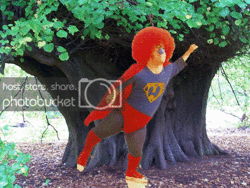
    sorry about the late reply the problem with scanning in multiple images in to your computer is you get the copy and paste problem. Below is an example of what I mean.

    In this example Im pasting a picture onto a background of a tree. The picture was scanned into a computer (not my picture just a random pic off yahoo), I'm simply going to select the magic wand tool and select the background area and delete it.


    Very rough edges, PS does a good job of cleaning them up, but still it doesnt look right, I personally think you are better off drawing your outline as one shape and putting it on the computer. Try out the scanner and see what happens some scanners are better than others, you might not have this problem. Any ways for the actual drawing I'm not sure how I can help, you really just draw what you want to draw if your having technical problems or need adivce on how to draw something specific let me know I may be able to help.

    Regards,
    Kevin

  6. #6
    Junior Member
    Join Date
    Jun 2008
    Posts
    9
    Thanks
    0
    Thanked 0 Times in 0 Posts
    heres the example it woulnt let me post cus i only had four posts....lol


Posting Permissions

  • You may not post new threads
  • You may not post replies
  • You may not post attachments
  • You may not edit your posts
Powered by vBulletin® Version 4.1.9
Copyright © 2012 vBulletin Solutions, Inc. All rights reserved.
Content Relevant URLs by vBSEO 3.6.0
Copyright 2011 Photoshop Gurus Forum. All rights reserved.
All times are GMT -5. The time now is 12:36 AM.