+ Reply to Thread
Results 1 to 10 of 10
  1. #1
    Junior Member
    Join Date
    Nov 2009
    Posts
    10
    Thanks
    0
    Thanked 0 Times in 0 Posts

    Text tool does not make new line

    I can't make paragraphs, every time I hit enter it commits, I keep having to open a new layer. The odd thing is it just started to happen, I've search google fo answers, maybe I ticked something by accident.

    Some ppl suggested to use the key pad to hit enter, this did not work.

    Any idea as to why this is happening?

    Thanks in advance

  2. #2
    Guru
    Join Date
    Jul 2009
    Location
    right in front of you
    Posts
    5,513
    Thanks
    20
    Thanked 123 Times in 120 Posts
    I find if you go to a different layer and then back to text layer, you need to make sure your original text is actually selected placement of text tool needs to be just about perfect

  3. #3
    Senior Member
    Join Date
    Nov 2009
    Posts
    165
    Thanks
    0
    Thanked 0 Times in 0 Posts
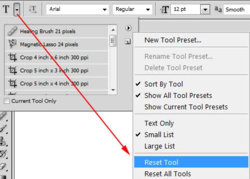
    Try this:


  4. #4
    Junior Member
    Join Date
    Nov 2009
    Posts
    10
    Thanks
    0
    Thanked 0 Times in 0 Posts
    Thanks for the replies

    I tried what was suggested but no luck :(

    Cheers

  5. #5
    Junior Member
    Join Date
    Nov 2009
    Posts
    10
    Thanks
    0
    Thanked 0 Times in 0 Posts
    Wow I accidently found my solution, not sure it will work for everyone but my numlock was on which caused the text to commit.

  6. #6
    Guru
    Join Date
    Jul 2009
    Location
    right in front of you
    Posts
    5,513
    Thanks
    20
    Thanked 123 Times in 120 Posts
    numlock......... is that a total state of numbness?

  7. #7
    Junior Member
    Join Date
    Nov 2009
    Posts
    10
    Thanks
    0
    Thanked 0 Times in 0 Posts
    Quote Originally Posted by iDad View Post
    numlock......... is that a total state of numbness?
    Yes.

    However it did resolve my issue

  8. #8
    Guru
    Join Date
    Jul 2009
    Location
    right in front of you
    Posts
    5,513
    Thanks
    20
    Thanked 123 Times in 120 Posts
    Lol that's all that matters congrats

  9. #9
    Senior Member
    Join Date
    Nov 2009
    Posts
    165
    Thanks
    0
    Thanked 0 Times in 0 Posts
    Quote Originally Posted by phaseman View Post
    Wow I accidently found my solution, not sure it will work for everyone but my numlock was on which caused the text to commit.
    It should NEVER matter whether num lock is on. Obviously you have some serious issues with your keyboard OR driver.

  10. #10
    Junior Member
    Join Date
    Nov 2009
    Posts
    10
    Thanks
    0
    Thanked 0 Times in 0 Posts
    Probably right I bought my crappy Acer in Beijing, thing never worked 100%...............DOH!!


Posting Permissions

  • You may not post new threads
  • You may not post replies
  • You may not post attachments
  • You may not edit your posts
Powered by vBulletin® Version 4.1.9
Copyright © 2012 vBulletin Solutions, Inc. All rights reserved.
Content Relevant URLs by vBSEO 3.6.0
Copyright 2011 Photoshop Gurus Forum. All rights reserved.
All times are GMT -5. The time now is 01:41 AM.