
Today I upgraded from CS3 to CS5, and so far I hate it. The main reason, is because I cannot view my pictures as zooms that I wish. I have a 64bit processor and over 75% of my harddrive is freespace. I shouldn't have problems with not enough memory or RAM, and CS3 worked PERFECTLY.
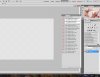
In Photo1 below, you can see that I have one layer open, the picture (look at the navigator screen) is open. However, at all zoom levels EXCEPT 100% the canvas shows - not the picture. When I have that image detached from tabs and just hovering, and am ACTIVELY moving the window around on the screen, I can see the full image.
Is there a reason why this is happening? A quick fix to it? It is quite possibly one of the more frustrating things I've faced with a photoshop!!!
In Photo1 below, you can see that I have one layer open, the picture (look at the navigator screen) is open. However, at all zoom levels EXCEPT 100% the canvas shows - not the picture. When I have that image detached from tabs and just hovering, and am ACTIVELY moving the window around on the screen, I can see the full image.
Is there a reason why this is happening? A quick fix to it? It is quite possibly one of the more frustrating things I've faced with a photoshop!!!
