+ Reply to Thread
Results 1 to 4 of 4
  1. #1
    Newbie
    Join Date
    Jun 2011
    Posts
    2
    Thanks
    1
    Thanked 0 Times in 0 Posts

    problem with path thumbnails size

    hi
    I'm having strange problem with Photoshop cs5

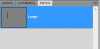
    the path thumbnails is set to small and no matter how much i change the size in panel options it still show in small size (as shown in the picture below)
    the layer and channel thumbnail are okay and i don't have any problem with them

    problem with path thumbnails size-problem.png


    if you know the solution please let me know
    thanks in advance

  2. #2
    Guru
    Join Date
    Mar 2010
    Location
    Mesa, Arizona
    Posts
    1,108
    Thanks
    0
    Thanked 71 Times in 70 Posts

    Re: problem with path thumbnails size

    The large thumbnail option only effects the layers palette, not paths.

  3. #3
    Newbie
    Join Date
    Jun 2011
    Posts
    2
    Thanks
    1
    Thanked 0 Times in 0 Posts

    Re: problem with path thumbnails size

    Quote Originally Posted by hawkeye View Post
    The large thumbnail option only effects the layers palette, not paths.
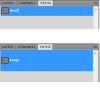
    no you can change the size of path thumbnails as well
    and i just fix it

    problem with path thumbnails size-problem2.png

  4. #4
    Guru
    Join Date
    Mar 2010
    Location
    Mesa, Arizona
    Posts
    1,108
    Thanks
    0
    Thanked 71 Times in 70 Posts

    Re: problem with path thumbnails size

    Good call, you need to set each palette individually. The same holds true for the channels palette.

  5. The Following User Says Thank You to hawkeye For This Useful Post:

    Alpha (06-04-2011)


Tags for this Thread

Posting Permissions

  • You may not post new threads
  • You may not post replies
  • You may not post attachments
  • You may not edit your posts
Powered by vBulletin® Version 4.1.9
Copyright © 2012 vBulletin Solutions, Inc. All rights reserved.
Content Relevant URLs by vBSEO 3.6.0
Copyright 2011 Photoshop Gurus Forum. All rights reserved.
All times are GMT -5. The time now is 03:36 PM.
vBulletin Skins