+ Reply to Thread
Page 1 of 2 12 LastLast
Results 1 to 10 of 12
  1. #1
    Junior Member
    Join Date
    May 2011
    Posts
    9
    Thanks
    1
    Thanked 0 Times in 0 Posts

    Suggestions for accurate color as well as exporting compression.

    Hi all,

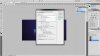
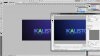
    I've determined that for reasons I dont quite understand the color's of the projects I am exporting are quite different from those within photoshop while working on my projects. I have taken some screenshots to demonstrate this.


    As you can see the Photoshop project I have going on looks quite different, the purple has become blue when previewing the render, and the actual render looks just like the preview. I dont believe it is a monitor calibration issue. Illustrator and After Effects are not exhibiting the same behavior.

    Additionally, when exporting images with gradients, what might be the ideal process and compression to reduce banding?

  2. #2
    Junior Member
    Join Date
    May 2011
    Posts
    9
    Thanks
    1
    Thanked 0 Times in 0 Posts

    Re: Suggestions for accurate color as well as exporting compression.

    Here are images

    <a href="http://www.flickr.com/photos/64338922@N05/6178539685/" title="wtf by Tyler | Kalisto Media, on Flickr"><img src="http://farm7.static.flickr.com/6153/6178539685_edc4227265_b.jpg" width="1024" height="576" alt="wtf"></a>

    <a href="http://www.flickr.com/photos/64338922@N05/6178539795/" title="wtfcolors by Tyler | Kalisto Media, on Flickr"><img src="http://farm7.static.flickr.com/6155/6178539795_2e1998a3bd_b.jpg" width="1024" height="576" alt="wtfcolors"></a>

  3. #3
    Guru
    Join Date
    Apr 2011
    Location
    born in U.S.S.R.
    Posts
    1,742
    Thanks
    36
    Thanked 120 Times in 112 Posts

    Re: Suggestions for accurate color as well as exporting compression.

    When Save for Web uncheck "Convert to sRGB". Then it shouldn't look diferent anymore.
    Rather than love, than money, than fame, give me truth. © Henry David Thoreau

  4. #4
    Junior Member
    Join Date
    May 2011
    Posts
    9
    Thanks
    1
    Thanked 0 Times in 0 Posts

    Re: Suggestions for accurate color as well as exporting compression.

    Thank you for the tip. I tried that, and it is still happening.

  5. #5
    Junior Member
    Join Date
    May 2011
    Posts
    9
    Thanks
    1
    Thanked 0 Times in 0 Posts

    Re: Suggestions for accurate color as well as exporting compression.

    When I dont do Save for Web and export as JPEG from "Save As..." It comes out looking great! I use save for web to get PNG's with transparency, so I do need to use Save for Web accurately :(

  6. #6
    Administrator
    Join Date
    Jul 2010
    Location
    New Jersey, USA
    Posts
    4,744
    Thanks
    12
    Thanked 160 Times in 150 Posts

    Re: Suggestions for accurate color as well as exporting compression.

    Lets make this easier.

    Suggestions for accurate color as well as exporting compression.-6178539795_2e1998a3bd_b.jpg

    Suggestions for accurate color as well as exporting compression.-6178539685_edc4227265_b.jpg

  7. The Following User Says Thank You to Steve For This Useful Post:

    Tylers86 (09-25-2011)

  8. #7
    Junior Member
    Join Date
    May 2011
    Posts
    9
    Thanks
    1
    Thanked 0 Times in 0 Posts

    Re: Suggestions for accurate color as well as exporting compression.

    Quote Originally Posted by Steve View Post
    Lets make this easier.

    Attachment 8833

    Attachment 8832
    Thank you Steve. I could not determine where to edit my previous post to correct the image attachments.

    Would you happen to be able to diagnose what the issue is based on the specifics so far?

  9. #8
    Junior Member
    Join Date
    May 2011
    Posts
    9
    Thanks
    1
    Thanked 0 Times in 0 Posts

    Re: Suggestions for accurate color as well as exporting compression.

    Quote Originally Posted by PhotoshopTroll1 View Post
    this works for me
    What are you referring to?

  10. #9
    Guru
    Join Date
    May 2011
    Location
    Sweden
    Posts
    1,359
    Thanks
    34
    Thanked 55 Times in 54 Posts

    Re: Suggestions for accurate color as well as exporting compression.

    Quote Originally Posted by Steve View Post
    Lets make this easier.

    Attachment 8833

    Attachment 8832
    I am having such problems with the same thing, I wish I could see what it says on your screen shot, but my eyes are too bad, could you maybe tell me what you have set it to?

  11. #10
    Forum Mod
    Join Date
    Jun 2011
    Location
    Imperial Beach, CA, US
    Posts
    3,575
    Thanks
    97
    Thanked 218 Times in 217 Posts

    Re: Suggestions for accurate color as well as exporting compression.

    I was curious because of the issues you've been having. I magnified and squinted the best I could. lol. They are the same as my default settings ... as far as I could tell
    Attached Thumbnails Attached Thumbnails Suggestions for accurate color as well as exporting compression.-colorsettings.png  

    Last edited by ibclare; 09-25-2011 at 04:43 AM.

  12. The Following User Says Thank You to ibclare For This Useful Post:

    Vafann (09-25-2011)


Posting Permissions

  • You may not post new threads
  • You may not post replies
  • You may not post attachments
  • You may not edit your posts
Powered by vBulletin® Version 4.1.9
Copyright © 2012 vBulletin Solutions, Inc. All rights reserved.
Content Relevant URLs by vBSEO 3.6.0
Copyright 2011 Photoshop Gurus Forum. All rights reserved.
All times are GMT -5. The time now is 04:30 PM.
vBulletin Skins