+ Reply to Thread
Page 1 of 3 123 LastLast
Results 1 to 10 of 28
  1. #1
    Junior Member
    Join Date
    Jan 2012
    Posts
    13
    Thanks
    0
    Thanked 0 Times in 0 Posts

    Fonts are crisp only at 100%

    I may be only imagining this, but I'm sure my Photoshop used to be pretty capable at rendering font until yesterday. Today, I find that font looks smooth only at 100% zoom level, and becomes badly jaggy even at 110% zoom-level. I have the "sharp" anti-aliasing method on, and have tried deleting the preferences file.

    In a PSD, there normally are different fonts in different sizes, but as far as I remember, zooming in and out never used to screw up the fonts as badly as it is doing now.

    In fact, when I export these files to PNGs and view them in Picasa even at 200%, there is no problem.

    I remember it was surely not this way before.

    Any help is greatly appreciated!

  2. #2
    Banned
    Join Date
    Jan 2012
    Location
    ...........
    Posts
    19
    Thanks
    0
    Thanked 2 Times in 2 Posts

    Re: Fonts are crisp only at 100%

    Try the same font at a larger size 300% rasterize> convert to smart object> and then scale it down and let me know if its still jagged?
    My fonts have always looked jagged on PS because pixels, that why I import Vector text from AI.

  3. #3
    Junior Member
    Join Date
    Jan 2012
    Posts
    13
    Thanks
    0
    Thanked 0 Times in 0 Posts

    Re: Fonts are crisp only at 100%

    Well, here's what I did:

    1. Opened a new file with 1024x768
    2. Selected Georgia size 60
    3. Anti-aliasing is set to "sharp"
    4. Zoom level is 75%

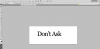
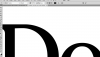
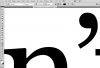
    The attached screenshot shows how jagged the font is. Although I'm a novice, I'm getting a feeling this is an overnight development. Why does it show fonts of any size crisp only at 100% zoom? Is this normal? If yes, funny I never noticed it before even though I work extensively with different fonts.

    Finally, I did convert this to smart object, but since it was initially jagged, it remains jagged after zooming out. I then set the zoom to 100%, and the font became butter-smooth, then converted to smart object, and on zooming out it's again getting jagged.
    Attached Thumbnails Attached Thumbnails Fonts are crisp only at 100%-damn-font.png  


  4. #4
    Forum Mod
    Join Date
    Mar 2002
    Location
    Here... ?
    Posts
    5,003
    Thanks
    10
    Thanked 191 Times in 189 Posts

    Re: Fonts are crisp only at 100%

    Horizon.... it's in the way PS displays fonts. At normal view, it appears smooth but when zoomed in, the jaggedness will show.

    Coverting the font to a smart object will also do that. In a way, PS displays the the font as a psedo vector thus the jagginess.

  5. #5
    Forum Mod
    Join Date
    Jun 2011
    Location
    Uk
    Posts
    5,620
    Thanks
    85
    Thanked 449 Times in 424 Posts

    Re: Fonts are crisp only at 100%

    You could change your preferences Edit > preferences> rulers and measurement and where it says type change it from point size to pixel size that way the font is displayed per pixel so tends to be a lot cleaner looking. However you have to remember a point size of 18 could be a pixel size of 100 or so they are a lot smaller and depends greatly on the resolution of your document.

  6. #6
    Junior Member
    Join Date
    Jan 2012
    Posts
    13
    Thanks
    0
    Thanked 0 Times in 0 Posts

    Re: Fonts are crisp only at 100%

    Well, thanks. I know I sound like a madman here, but I'm really surprised I didn't notice this before. I made a couple of web layouts before this, and given how sensitive I am to fonts (well, who isn't!), I should have noticed it earlier somehow. The trouble is the font appears broken both when I zoom in and zoom out. I don't think it used to happen when I zoomed out, but suddenly it is.
    Something has gone wrong somewhere, either with Photoshop or with my mind. :(

  7. #7
    Junior Member
    Join Date
    Jan 2012
    Posts
    13
    Thanks
    0
    Thanked 0 Times in 0 Posts

    Re: Fonts are crisp only at 100%

    Hoogle: Sorry changing the units didn't change anything for me. Should the font look bad even at 90%? I don't remember it being so.

  8. #8
    Junior Member
    Join Date
    Jan 2012
    Posts
    13
    Thanks
    0
    Thanked 0 Times in 0 Posts

    Re: Fonts are crisp only at 100%

    Update: I noticed something very funny. The text looks great only at 25%, 50%, and 100% zoom levels. Anything other than this, and it's broken beyond hope. I hope this offers some clue. Thanks for all the help so far!

  9. #9
    Forum Mod
    Join Date
    Jun 2011
    Location
    Uk
    Posts
    5,620
    Thanks
    85
    Thanked 449 Times in 424 Posts

    Re: Fonts are crisp only at 100%

    Photoshop does not do accurate zooms to process it quicker they actually put some code into it where it will zoom at original quality at some interim points and sorts of guess the 1s inbetween. There is some trick to to get it more accurate but for the likes of me I cant remember where I saw it I am thinking it was on 1 of the lynda.com typography tutorials

  10. #10
    Silly Trucker
    Join Date
    May 2011
    Location
    Trucking the big roads, dust and all.
    Posts
    4,564
    Thanks
    44
    Thanked 228 Times in 223 Posts

    Re: Fonts are crisp only at 100%

    The largest size you need is a 100% of the original size.

    Another thing is when working in photoshop make sure you tried all the different anti-aliasing modes of the text - SHARP/SMOOTH/CRISP ETC. I usually use smooth and it works. Depending on the font sometimes crisp is the better choice.
    Make sure your dpi is always set to 72. If you try 300 for example it will look very bad on your monitor but on a high quality print it'll be perfect. And if you use a 300dpi for a flash it automatically resizes it to 72 which is a 4 times reduction in size and its kind of normal to loose quality.

    Another thing is to use vector outlines for the type (convert to shape in Photoshop). It should always be perfect no matter how you resize it.


Tags for this Thread

Posting Permissions

  • You may not post new threads
  • You may not post replies
  • You may not post attachments
  • You may not edit your posts
Powered by vBulletin® Version 4.1.9
Copyright © 2012 vBulletin Solutions, Inc. All rights reserved.
Content Relevant URLs by vBSEO 3.6.0
Copyright 2011 Photoshop Gurus Forum. All rights reserved.
All times are GMT -5. The time now is 04:39 PM.
vBulletin Skins