+ Reply to Thread
Results 1 to 6 of 6
  1. #1
    Newbie
    Join Date
    Sep 2008
    Posts
    1
    Thanks
    0
    Thanked 0 Times in 0 Posts

    2 color photoshop logo

    How do I make a logo in photoshop look like it has a drop shadow and only 1 other color but still maintain the beveled look? I want to send it to press, but don't want to end up with all the other color plates. Thanks.

  2. #2
    Power User
    Join Date
    Oct 2008
    Location
    Des Plaines, ILL
    Posts
    240
    Thanks
    0
    Thanked 1 Time in 1 Post
    create the logo, add drop shadow, merge with blank layer, add color overlay, and bevele

  3. #3
    Junior Member
    Join Date
    Oct 2008
    Posts
    16
    Thanks
    0
    Thanked 0 Times in 0 Posts
    Can I ask a really stupid question here?
    The logo isn't vector?

    If it's raster and you are placing it in Illustrator, is the resolution available to do what you want to do?

    You may be able to do the color work with spot channels. Duotone probably won't work. Key or Kool can answer that one.

    I would contact the client and see if there is a vector version of the logo available and just plop that into Illustrator rather than a placed raster image.

  4. #4
    Guru
    Join Date
    Apr 2011
    Location
    born in U.S.S.R.
    Posts
    1,742
    Thanks
    36
    Thanked 120 Times in 112 Posts

    Re: 2 color photoshop logo

    Don't think that you need to merge anything or something. First of all, work with CMYK then just make sure your 1 color ir realy 1 "color". Only cyan or magenta or yellow. Not like 1 color is green, because green contains (separates) at least 2 cmyk colors. If you need green (choose it from any panthone color and remember) even then use 1 'color chanell' and when you give to press say to men what real panthone color you substitute your 1 'color chanell'.

    So...work in CMYK (not RGB), use one 'color chanell'. Bevel and Emboss and Drop Shadow wont produce new colors. Image will stay in 2 colors - one yours choosen and black.
    Rather than love, than money, than fame, give me truth. © Henry David Thoreau

  5. #5
    Guru
    Join Date
    Apr 2011
    Location
    born in U.S.S.R.
    Posts
    1,742
    Thanks
    36
    Thanked 120 Times in 112 Posts

    Re: 2 color photoshop logo

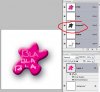
    Thats all of course if i understood you correct and you need something like this:
    2 used color plates - Magenta (logo) and Black (Bevel/Shadow)
    2 color photoshop logo-2colorlogo.jpg

    looks awkward of course. If you want to see how it will really look then change color mode to Multichanell (after you finish your logo and ready to send to press) and double click on Magenta in Chanells palet. Assign your desire color and you'll see something close to real color but color information will not be changed. Usually that kind of Color Mode can be used for press but thats depend on poligraphy firm.
    Rather than love, than money, than fame, give me truth. © Henry David Thoreau

  6. #6
    Senior Member
    Join Date
    Jun 2011
    Posts
    123
    Thanks
    2
    Thanked 17 Times in 16 Posts

    Re: 2 color photoshop logo

    PS is not the right soft for logo creation and you must know that


Posting Permissions

  • You may not post new threads
  • You may not post replies
  • You may not post attachments
  • You may not edit your posts
Powered by vBulletin® Version 4.1.9
Copyright © 2012 vBulletin Solutions, Inc. All rights reserved.
Content Relevant URLs by vBSEO 3.6.0
Copyright 2011 Photoshop Gurus Forum. All rights reserved.
All times are GMT -5. The time now is 05:56 PM.
vBulletin Skins