-
Junior Member
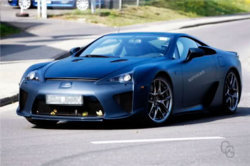
Lexus LF-A spy shots
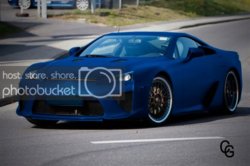
I put my spin on the LFA but I'm still not sure how to make the paint look glossy instead of flat. I outlined the body of the car minus the vents/windows/grills/etc and copied it. Then desaturated it and added color through hue/saturation. If anybody has tips please chime in. I've been using PS for about 5 months. -Chris-
Last edited by ni$mo350; 09-27-2009 at 12:59 PM.
-
-
Guru
-
-
Junior Member

Originally Posted by
iDad
Looks good nice job!
Thanks! Did you have any suggestiosn on how to make the paint look glossy instead of flat?
-
-
Guru
the picture I see does not look flat, but could you add a very slight bevel emboss to it and maybe glass effect to put a shine(using a separate layer)
-
-
It doesn't look god, because you've turned it into a matter color, when it actually needs shine to look good.
Notice what happens when I take your blue photo and place it over the gray one and set the blending mode to soft light:

Notice the shine?
*Note that I posted the photo just to show the effect, of course you shouldn't use the blue photo on top of the gray one to fix the actual problem.
So if you used a Solid Color or Hue & Saturation layer to get your color or any other layer, make sure you fiddle with the blending modes of that layer.
-
Posting Permissions
- You may not post new threads
- You may not post replies
- You may not post attachments
- You may not edit your posts
Forum Rules
Powered by
vBulletin® Version 4.1.9
Copyright © 2012 vBulletin Solutions, Inc. All rights reserved.
Content Relevant URLs by
vBSEO 3.6.0
Copyright 2011 Photoshop Gurus Forum. All rights reserved.
All times are GMT -5. The time now is 04:51 PM.