
+ Reply to Thread
Page 1 of 2 12 LastLast
Results 1 to 10 of 13
Like Tree4Likes

Thread: Tree_Bark_Textured_Skull

  1. #1
    Guru
    Join Date
    Jan 2011
    Location
    Elizabeth Port NJ
    Posts
    1,503
    Thanks
    15
    Thanked 149 Times in 143 Posts

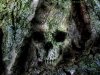
    Tree_Bark_Textured_Skull

    Hi fellow community members

    I was working whit PS, and started playing whit some liquify and layer blendings.

    So I came up whit this, it was a lot of fun.

    Tree_Bark_Textured_Skull-bark_skull.jpg

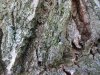
    By the Way, thanx to Zeealex for this awesome texture

    Tree_Bark_Textured_Skull-img_0073.jpg

    Constructive criticism is always welcome.
    M@X
    Paul, ibclare, siodre and 1 others like this.
    Cuando soy Bueno, soy muy BUENO
    Pero cuando soy malo, soy mucho MEJOR

  2. #2
    Senior Member
    Join Date
    Jun 2011
    Location
    Raxacoricofallapatorius
    Posts
    147
    Thanks
    6
    Thanked 13 Times in 13 Posts

    Re: Tree_Bark_Textured_Skull

    it doesn't pop out immediately, but when it does it's a little creepy if you're not expecting it.

  3. #3
    Silly Trucker
    Join Date
    May 2011
    Location
    Trucking the big roads, dust and all.
    Posts
    4,564
    Thanks
    44
    Thanked 228 Times in 223 Posts

    Re: Tree_Bark_Textured_Skull

    Nice job sir.


  4. #4
    Guru
    Join Date
    Apr 2011
    Location
    born in U.S.S.R.
    Posts
    1,742
    Thanks
    36
    Thanked 120 Times in 112 Posts

    Re: Tree_Bark_Textured_Skull

    And nice idea.
    Rather than love, than money, than fame, give me truth. Đ Henry David Thoreau

  5. #5
    Guru
    Join Date
    May 2011
    Location
    Sweden
    Posts
    1,359
    Thanks
    34
    Thanked 55 Times in 54 Posts

    Re: Tree_Bark_Textured_Skull

    Thatīs cool! I have been thinking about doing something like that, but I thought that you had to use displacement maps or whatever itīs called, and I havenīt really gotten the hang of that yet. You did this by only using liquify and layer blending modes? I would love to know how you did it.

  6. #6
    Guru
    Join Date
    Jul 2011
    Location
    on a computer... duuh
    Posts
    1,331
    Thanks
    90
    Thanked 40 Times in 38 Posts

    Re: Tree_Bark_Textured_Skull

    love it Maximus! very subtle and it blends well with the base texture i'm glad my texture was of use to you

  7. #7
    Guru
    Join Date
    Jan 2011
    Location
    Elizabeth Port NJ
    Posts
    1,503
    Thanks
    15
    Thanked 149 Times in 143 Posts

    Re: Tree_Bark_Textured_Skull

    Yes Vafann

    I've also used a displacement map before using the liquify filter,
    this was done in order to define the bumps in the image, remember highlights create bumps in your image and shadows creates deep or hollow surfaces, that's how you get the object to have the "coming out from the surface effect"

    if needed, after creating your displacement map you can use a soft brush to paint manually some areas that you may consider it will be necessary

    Also used some smudging to soft mix the object edges whit the background texture, after that just used dodge and burn to increase highlights and darken some shadows.
    Cuando soy Bueno, soy muy BUENO
    Pero cuando soy malo, soy mucho MEJOR

  8. #8
    Guru
    Join Date
    May 2011
    Location
    Sweden
    Posts
    1,359
    Thanks
    34
    Thanked 55 Times in 54 Posts

    Re: Tree_Bark_Textured_Skull

    Quote Originally Posted by $1r_M4x1mu$ View Post
    Yes Vafann

    I've also used a displacement map before using the liquify filter,
    this was done in order to define the bumps in the image, remember highlights create bumps in your image and shadows creates deep or hollow surfaces, that's how you get the object to have the "coming out from the surface effect"

    if needed, after creating your displacement map you can use a soft brush to paint manually some areas that you may consider it will be necessary

    Also used some smudging to soft mix the object edges whit the background texture, after that just used dodge and burn to increase highlights and darken some shadows.
    Thank you maximus, I have used your tips as inspiration for this weeks challenge in the contest forum!

  9. #9
    Junior Member
    Join Date
    Aug 2011
    Posts
    21
    Thanks
    3
    Thanked 0 Times in 0 Posts

    Re: Tree_Bark_Textured_Skull

    Thats awesome!

  10. #10
    Guru
    Join Date
    Aug 2011
    Location
    Sweden
    Posts
    559
    Thanks
    28
    Thanked 32 Times in 32 Posts

    Re: Tree_Bark_Textured_Skull

    yet another cool one! looks great!


Tags for this Thread

Posting Permissions

  • You may not post new threads
  • You may not post replies
  • You may not post attachments
  • You may not edit your posts
Powered by vBulletin® Version 4.1.9
Copyright © 2012 vBulletin Solutions, Inc. All rights reserved.
Content Relevant URLs by vBSEO 3.6.0
Copyright 2011 Photoshop Gurus Forum. All rights reserved.
All times are GMT -5. The time now is 06:10 PM.
vBulletin Skins