
-
Tab Color issue
This is my first time making a site with tabs. I thought I could create each page with a colored tab for the selected page in Photoshop then upload each pages html and images and the tab color would change w/ each selected page. Was I correct in thinking this?
I have also been having problems with the domain host (Fatcow) it's been screwy with the site. Just doing a simple upload has been an issue.
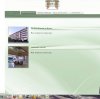
I attached an image of what the tabs look like. I uploaded the about page and "properties owned" html and images. As you can see both tabs are colored in for each page. It should only turn green with the selected page.
-
-
Member
Re: Tab Color issue
Ok, here's the usual way to organise a page like yours in basic format:
1) create one HTML page and save all associated files like images, CSS, scripts etc in subfolders relative to the pages' root directory. This is your template. From this template you will create all other pages.
2) have two images per tab, one active state and one passive state
3) give a class to each tab, And give an ID to the "active" tab on each page. So on the about page the "about" tab would be the active one (I usually call it "current") e.g.:
<div class="tab">Home</div>
<div id="current">About</div>
<div class="tab">Contact</div>
<div class="tab">Whatever</div>
4) set one of the green background is for calss="tab", set the active tab background for id="current"
5) do this for all pages, so on the contact page for example it would look like so:
<div class="tab">Home</div>
<div class="tab">About</div>
<div id="current">Contact</div>
<div class="tab">Whatever</div>
classes are for recurring elements which can have many Instances on one page. IDs are for single instances, they can only be one div with ID "current" on this page.
Does that make sense?
Cheers
Chris
Last edited by chrisatlemon; 05-27-2011 at 09:04 AM.
-
-
Re: Tab Color issue
Thank you for the response chrisatlemon. I know ImageReady had rollover effects options. Can all of this be done with PS & Dreamweaver? Is there a tutorial on setting active and passive states w/ Photoshop.
-
-
Member
Re: Tab Color issue
Your question should not be whether it can be done in Photoshop or Dreamweaver. That's irrelevant. Can this be done in HTML/CSS? That is the question. Answer is: yes!
Now you use your tool of choice to create the respective files.
Photoshop is an image editing tool. Use photoshop to create the two sets of images, one for active, one for passive.
Use Dreamweaver to create the HTML and CSS which makes the hover behaviour happen on a webpage.
So for example: in your HTML you have a link:
<a href="index.html">Home</a>
And in your CSS you specify the format of this link by assigning a background image:
a {
background: url(images/background-passive.gif);
}
a:hover {
background: url(images/background-active.gif);
}
Now this is very simplistic. You will probably want to assign a specific class to the link and you will probably have that link within a container such as a paragraph, a list item, or a div. So this is just to give you an idea how it works.
It's not the software which creates rollover effects. You create the rollover effect using the images you prepared in your image editing program of choice. Or you may not need images at all, you can just use a coloured background, or a different colour for text up on hover etc
Does that make sense
Cheers
Chris
-
Tags for this Thread
Posting Permissions
- You may not post new threads
- You may not post replies
- You may not post attachments
- You may not edit your posts
Forum Rules
Powered by
vBulletin® Version 4.1.9
Copyright © 2012 vBulletin Solutions, Inc. All rights reserved.
Content Relevant URLs by
vBSEO 3.6.0
Copyright 2011 Photoshop Gurus Forum. All rights reserved.