
Hi all,
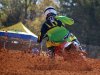
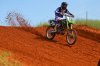
Looking for some techniques on creating - either close to or even stylized - roost or particle sprays. I've attached a couple of examples of what I'm talking about. I do some editing for posters of the motocross photos I take and I find that creating a spray of dirt like in the photos to be very difficult. I would love to hear any particle techniques or suggestions on this - maybe there is a plugin or filter that would help. Stylized or abstract would be fine as well.
Thanks so much!
Looking for some techniques on creating - either close to or even stylized - roost or particle sprays. I've attached a couple of examples of what I'm talking about. I do some editing for posters of the motocross photos I take and I find that creating a spray of dirt like in the photos to be very difficult. I would love to hear any particle techniques or suggestions on this - maybe there is a plugin or filter that would help. Stylized or abstract would be fine as well.
Thanks so much!


