What's new
Photoshop Gurus Forum

Welcome to Photoshop Gurus forum. Register a free account today to become a member! It's completely free. Once signed in, you'll enjoy an ad-free experience and be able to participate on this site by adding your own topics and posts, as well as connect with other members through your own private inbox!

Looking for advice on how this effect is done!


PhilAJ52

New Member
Messages
2
Likes
0
Hi there. I think I'm a reasonable PS user and can do most basic things.

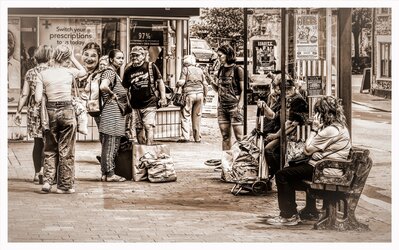
I recently saw some images from someone else and would love to try and replicate the effect on some of my images. I did ask the author of the images, but she doesn't use PS - and did them in Affinity.

Any ideas how I can get this effect in PS?Lisa2.jpgLisaImage1.jpg
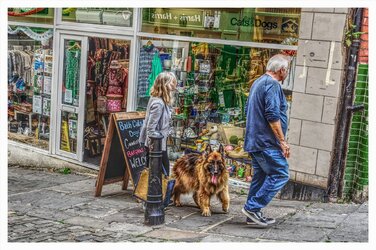
 
Brief advice..........so you can start looking.

The first (top) image is an old and tired HDR (High Dynamic Range) effect. Look HERE

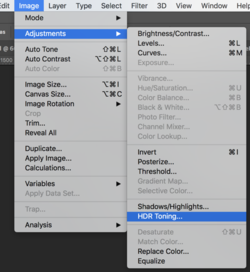
There is also some HDR toning in Ps...
Screen Shot 2023-07-01 at 8.39.15 AM.png

The second (bottom) image is a monochromatic effect with a slight sepia filter. It seems to have some HDR toning as well. You could use a Black & White adjustment layer to balance the hues in an image then add a Photo Filter adjustment layer with a sepia filter. HDR in in Camera Raw.

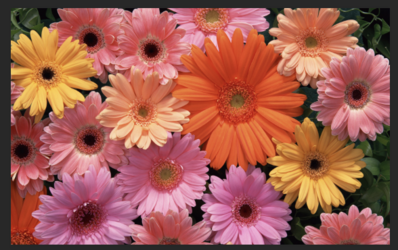
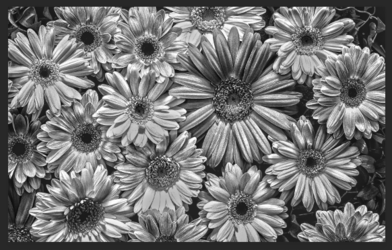
Simple HDR toning with B&W adj layer and Ps native HDR Toning ........
Before
Screen Shot 2023-07-01 at 8.32.03 AM.png
After
Screen Shot 2023-07-01 at 9.23.09 AM.png
 

Back
Top