What's new
Photoshop Gurus Forum

Welcome to Photoshop Gurus forum. Register a free account today to become a member! It's completely free. Once signed in, you'll enjoy an ad-free experience and be able to participate on this site by adding your own topics and posts, as well as connect with other members through your own private inbox!

Photo Help


brantonlj

New Member
Messages
3
Likes
0
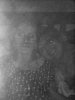
I have a photo that was taken of a friend and her mother who is really sick. It has a horrible flash in it and after playing with it almost all day. Adding layers, changing colors, and hues I cannot get it to look atleast somewhar useable. I am going to attach it here. If anyone can offer me some advice on how to fix it even a little that would be great. I have some skills in photoshop but this one has gotten the best of me. Thanksscottphoto.jpg

 
Hi

I'm really sorry to hear about your friends mother.

I have tried to improve the picture but as I'm sure your aware its pretty poor quality. I don't have much time at the moment but will have another look later. For now this is what I managed to achieve. (HDR and a few filters)

The are a few people on this site that can do amazing things with poor images and perhaps one of them will be able to make a better job of it than me.

Good luck

PS I'm happy to put up the PSD for anyone who would like to see where I got to and take it further.

scottphotobalckwhite.jpgscottphotoccolour.jpg
 
Thank you so much. Thats about as far as I got the photo, before I came here. This photo means a lot to my friend and I am the only person she and her husband knows that might be able to help. Thats why I came here I figured an expert might be able to help me, google search returned nothing useable. Thanks, again.
 
No probs, like I said I will have another go and see if something cant be done to improve it more (fingers crossed), I'm hopeful a few others will be able to have a go to or at least give you a few tips :)
 
Hi brantonlj,
Is there a chance for you to can scan the picture again? Even if the size is fairly big the resolution is low and there are only that much of color information.A different scanning setting will greatly improve the chances of a better result on the picture.
 
I didnt scan the picture in, she emailed it to me this is the original format she gave it to me so I am imagining it was taken on a digital camera, but I will ask. What settings should I focus on?
 

Back
Top